




.png)
.png)
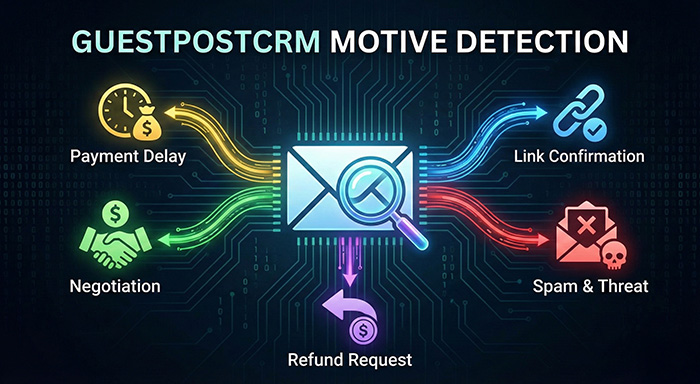
In outreach-heavy businesses like guest posting, link insertion, and SEO content placements, not all emails carry the same intention. Some want to negotiate. Some want refunds. Some want DR-based discounts. Some want link confirmation. Some want threats or blacklisting. And some are pure spam.
Understanding the intention behind every email is critical for fast decision-making.
That’s why GuestPostCRM utilizes Motive Detection — a robust AI-driven system supported by 50+ hand-carved prompts that automatically identify what the sender looks for. This blog explores how the motive in GuestPostCRM helps businesses foster greater efficiency, faster response, and healthy client relationships.
What Is Motive?
Motive refers to the real intention of the email sender. In GuestPostCRM, every incoming email is analyzed and assigned a specific motive category.
This helps the system:
- Route the email to the correct action
- Assign the right status to deals and offers
- Generate correct automated replies or AI avatar videos
- Understand urgency, risk, opportunity, and required action
- Keep your CRM pipeline extremely clean
How Motive in GuestPostCRM Works
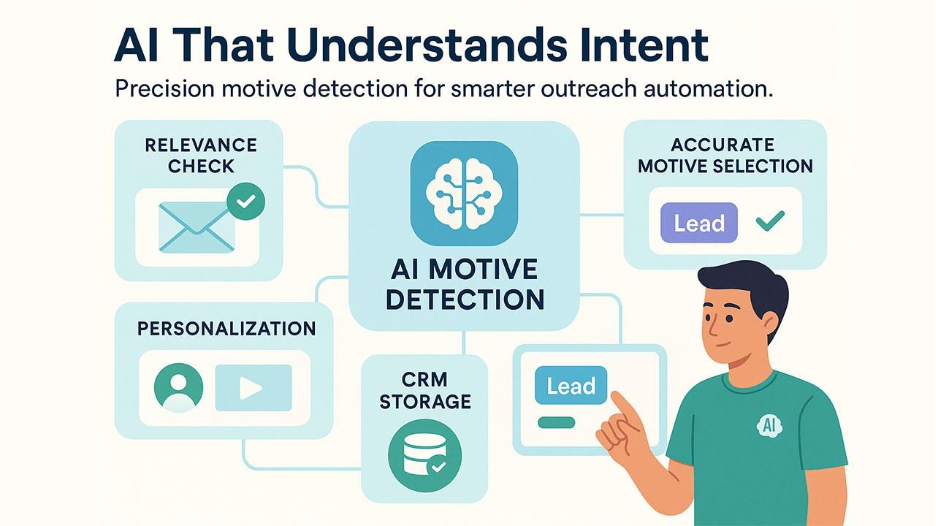
Each email goes through 5 steps:
Step 1—Check Relevance
A prompt evaluates if the message is related to:
- Guest posting
- Sponsored posts
- Link insertion
- SEO outreach
- Backlink placement
- Article contributions
- Content collaboration
etc.
If yes → Accept
If not, move to non-relevance.
Step 2—Run 50+ Motive Prompts
Each motive in GuestPostCRM has a dedicated AI prompt that checks for very specific signals.
Example prompt (you shared):
Check if this incoming message is related to guest post (GP) business.
Look for:
- guest posting
- sponsored posts
- link insertion
- link exchange
- SEO outreach
- paid placements
- backlink placement
If any such intent is detected, Respond "accept."
Otherwise -> "reject"
Similar prompts exist for:
- Negotiation
- Payment issues
- Quality complaints
- Expired link replacements
- Domain change
- Threat/blacklisting
- Refund
- Multiple revisions
- Anchor text change
etc
Step 3 — Pick the Most Accurate Motive
The AI evaluates all 50+ prompts and selects the one that matches best.
Step 4 — Store it on the contact and deal
This helps in:
- Reply suggestions
- Deal pipeline movement
- AI avatar video content
- Automation
- Tracking the full story
Step 5—Personalization
Your AI avatar videos use the motive to speak contextually:
- “You requested link replacement…”
- “We noticed payment is delayed…”
- “You asked for DR negotiation…”
This delivers a futuristic client experience.
GuestPostCRM provides motive detection as a default feature to help businesses streamline their email management from day one. However, the platform also offers flexibility—you can customize motive detection settings based on your workflow needs. If certain motive categories aren't relevant to your business, you can choose to enable or disable specific motives, ensuring your CRM focuses only on the intentions that matter most to your operations
Also Read: What Are Order Reminders in GuestPostCRM?
Real Examples of Motive in GuestPostCRM

Below is the same list you provided, rewritten cleanly with short explanations:
Spam Detection
Identify emails that appear spammy, scam-related, fake, or irrelevant to your business, ensuring clean and safe communication.
Expired Link Replacement
Detects when a sender wants an outdated, expired, or backdated link replaced with a new working one.
Payment Delay
Recognizes messages where buyers admit payment delays or request an extension for completing the transaction.
Site Ownership Doubt
Flags emails where the sender questions whether you genuinely own or manage the site mentioned.
Domain Change
Catches conversations where publishers inform you about shifting to a new domain or website address.
GP / LI Detection
Identifies interest in guest posting or link insertion requests, whether for new articles or existing content.
Negotiation by Third-Party Reseller
Detects pricing or deal negotiations coming from agencies, marketplaces, or third-party resellers.
Content Quality Complaint
Recognizes when clients express dissatisfaction with the quality, tone, or structure of the delivered article.
Link Exchange Offer
Flags emails where senders propose reciprocal link exchanges or partnership backlinks.
Turnaround Time Pressure
Identifies urgent requests demanding faster content delivery, publication, or processing.
Payment Method Issue
Covers problems related to payment platforms like PayPal, Stripe, Wise, crypto, or other gateways.
Negotiation on DA/DR
Detects when senders negotiate prices based on your website’s domain metrics such as DA or DR.
Manual Proof Request
Recognizes requests for screenshots, live samples, analytics, or any proof of site ownership.
Banner/Footer/Home Page Link
Identifies requests for premium placements such as banners, homepage links, or footer backlinks.
Additional Link Request
Flags when the sender wants one or more extra links added inside the same article.
Link Count Limitation
Detects concerns or negotiations related to the maximum number of links allowed in an article.
Determine Offer
Catches emails asking you for pricing, service packages, or a custom proposal.
Seasonal Campaign
Recognizes temporary promotions, bulk orders, or short-term marketing campaigns tied to seasons.
Extra No-Follow Link
Identifies requests for adding an additional no-follow link within the same placement or article.
Article Confirmation
Flags when the sender confirms their article is ready, attached, or approved for publication.
Blacklist / Threat
Covers negative messages involving complaints, warnings, threats, or attempts to pressure you.
Business Detect
General category for normal business conversations that do not indicate a specific intention.
Regular Reply
Captures standard communication without negotiation, conflict, or specific requests.
Content Guidelines
Identifies when a sender is asking for or sharing writing, formatting, or editorial guidelines.
Site Rejection
Flags responses where your site, offer, or proposal is declined or not considered suitable.
Competitor Link Removal
Detects requests demanding the removal of a competitor’s link from your content.
Multiple Revisions
Recognizes messages asking for repeated content edits, corrections, or refinements.
Price Negotiation
Identifies direct attempts to reduce the quoted price or negotiate discounted rates.
Filter Sender
Flags emails where the sender is checking your legitimacy or trying to verify your authenticity.
Payment After Link Fraud
Detects suspicious offers asking you to place a link first and pay later, signaling high scam risk.
Refund Request
Captures emails asking for partial or full refunds due to dissatisfaction or deal issues.
Initial Question
Recognizes general queries or first-step questions before beginning a negotiation or order.
Order Verdict
Flags messages asking for status updates, approval decisions, or final verdict on an order.
Deal Discount
Identifies requests for discounted pricing on bulk orders or multi-link purchases.
Traffic Guarantee
Detects when the sender asks for proof or guarantee of website visitors or traffic levels.
Deal Period Not Enough
Covers complaints about limited link guarantee periods, such as the standard 3-month duration.
Re-post Request
Flags requests to republish or replace an article due to issues like errors, updates, or removals.
Lifetime Link Guarantee
Identifies messages demanding permanent backlink placement instead of time-limited guarantees.
Long-term Deal Promise
Recognizes interest in recurring deals, bulk monthly orders, or long-term collaborations.
Link Confirmation
Catches emails asking whether a link is placed, live, indexed, or properly added.
Payment Confirm
Flags messages confirming that the sender has completed payment successfully.
Deal Confirmation
Identifies messages approving your offer, rates, or finalizing an agreement.
Anchor Text Change
Detects requests to modify anchor text, keywords, or link phrasing in the article.
Hidden Sponsorship
Recognizes attempts to hide the “sponsored” or “paid” tag against policy guidelines.
Multi-Site Package
>br/>Flags requests for packages or pricing across multiple websites at once.
Niche Confirmation
Identifies when senders ask whether your website fits their niche or topic requirements.
Link Removal
Detects messages where someone wants their own or someone else’s link removed.
Link Placement Demand
Flags strict placement instructions—exact paragraph, position, or formatting for the link.
Non-English Content
Identifies when the sender wants content delivered in another language.
Third-Party Verification
Recognizes requests for adding schema, real attributes, or external verification tags.
How Motive Helps Grow Your Business
Faster Replies
CRM suggests reply templates based on motive.
Better Deal Flow
Deals automatically move to the correct stage.
Accurate AI Avatar Videos
Videos speak contextually based on motive, offer, and deal.
Cleaner CRM
Miscommunication drops to near zero.
Better Analytics
You understand:
- Which motives produce most deals
- Which motives cause delays
- Which motives produce refunds or conflicts
Smarter Payment Follow-ups:
When motive detection identifies payment-related intentions such as payment delays, payment confirmation requests, or payment method issues; GuestPostCRM can trigger contextually appropriate payment reminders. The platform offers full customization in these payment reminders, giving you complete control over how and when clients receive follow-ups based on their detected motive. If you prefer not to use automated reminders for certain motive categories, you can simply disable them selectively. If you want a quick setup, the system provides default reminder settings that work immediately for all payment-related motives. And if your agency follows specific communication protocols based on client intent, you can customize everything—from the exact date and time of each reminder to the number of follow-ups and the message tone tailored to each motive type. This level of flexibility ensures your payment communications align perfectly with the detected intention behind each email, helping you maintain professionalism while addressing payment concerns proactively without any manual analysis or tracking.
Final Summary
Motive in GuestPostCRM works as the integrated AI understands the intention behind every email. It leverages 50+ specialized prompts to identify the genuine intention behind emails, including negotiation, link interchange, refund requests, payment delays, threats, revisions, or link exchange.
This makes your CRM:
- Smarter
- Faster
- More organized
- Highly automated
- Ideal for the guest post domain
However, this approach not only helps businesses know the real intention behind every email but also reduces the risk of missed opportunities and increases deliverability.
FAQs for motive in GuestPostCRM
Q. What does “motive” mean in GuestPostCRM?
A. Motive means the real intention behind every incoming email. In GuestPostCRM, there are 50+ AI prompts to detect the accurate motive for which the email is received. This helps your CRM to move, respond, and automate actions correctly.
Q. How does motive detection work?
A. GuestPostCRM’s AI motive detection scans thoroughly each email using prompts and assigns the most actual motive to businesses.
Q. What types of motives can GuestPostCRM detect?
A. There are over 50 motive in GuestPostCRM, including negotiations, client support, payment delays, refunds, domain changes, deal confirmation, offer requests, and general business queries.
Q. Can AI detect spam or irrelevant emails?
A. Absolutely, the system also detects and filters certain spam and unrelated emails efficiently so that your CRM doesn’t clutter your CRM.
Q. Is motive detection important for client communication?
A. Understanding email intent is crucial for businesses to deliver fast responses, keep clean CRM pipelines, and improve client communication.



.png)
.png)