Scroll to Top

Automate Guest Posting from Pitch to Publication

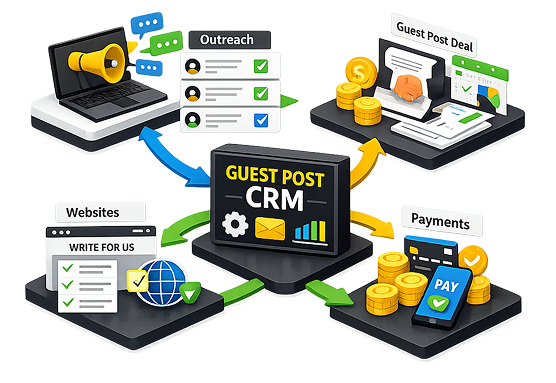
Manage everything with a powerful Guest Posting CRM designed for publishers, agencies, and Write-for-us websites. This advanced Guest Post CRM Software helps you streamline outreach, deals, and payments from one place — so nothing slips through the cracks between the first pitch email and the final live link. Instead of juggling spreadsheets, inboxes, and payment trackers separately, your entire guest posting operation runs through a single, organized system built for teams that outreach at scale.
Guest Post CRM

Never Lose a Guest Post Opportunity Again with
a Smart CRM for Guest Posting

Intro line: From emails to deals and payments, this CRM for Guest Posting ensures every inquiry is tracked and managed effectively — right from the moment a publisher or client first reaches out, all the way through to a closed, paid, and published placement, so no opportunity quietly disappears in a crowded inbox.

Smart inbox

Integrate multiple email accounts and route all publisher conversations into one clean, manageable inbox with this SEO Guest Posting CRM, so nothing lands in spam. Every incoming pitch, reply, and follow-up is automatically organized by conversation and status, giving your team a single, distraction-free view instead of switching between multiple mailboxes throughout the day.

AI Reply Templates

Instantly send branded/non-branded first responses and conditional follow-ups with pre-built, customizable templates using a powerful Guest Post Automation Tool to keep leads warm. Templates adapt automatically based on the stage of the conversation, so publishers and clients always receive a timely, relevant reply — even when your team is handling dozens of threads at once.

Automated Invoicing

Generate PayPal invoices instantly and automatically send up to 3 scheduled reminders for unpaid or delayed invoices without manual follow-ups with a built-in Client Order Management System. This keeps cash flow predictable and removes the awkward, time-consuming task of chasing payments manually, while giving you a clear real-time view of what's paid, pending, or overdue.

Complete Publisher Profiles in Your Guest Posting CRM

Access all key metrics and complete contact details for each publisher in your network using a powerful Guest Post CRM Software built for scalability — everything your team needs to qualify, negotiate, and place content is stored in one profile, updated automatically as new activity comes in.

  • SEO Metrics – Easily track domain authority, traffic range, past placement performance, and niche categories within a centralized SEO Guest Posting CRM, so your team can shortlist strong sites at a glance instead of manually checking each one.
  • Niche Compatibility – Instantly analyzes whether a site aligns with your client's niche or your own requirements inside a structured Guest Posting CRM, reducing wasted outreach on publishers that are unlikely to convert.
  • Contact Information – Record email address, communication history, and previous interactions for quick future reference, ensuring your team always has the full context before reaching out again.
  • Publication Record – Quickly review previous content, anchor texts, link status, and performance metrics at a glance within your Guest Posting CRM dashboard, making it easy to spot repeat opportunities and track long-term link health.
Publisher CRM

Track Every Placement with AI-powered Guest Posting CRM Dashboard

Keep track of performance and ROI in real time with a clean, structured view using advanced Guest Post CRM Software — every metric that matters to your outreach and link-building efforts is visible from a single dashboard, updated live as your team works.

Moved Emails
Inside inbox & spam will be shown, sorted automatically so nothing genuine gets buried.
All Backlinks
All backlinks content shown here, with live status tracking.
Defaulters
All defaulters listed here for faster payment follow-up.
Bulk Marking
All bulk marking listed here to update multiple records at once.
Reports
Reports will be shown here with exportable summaries.
Spam Detection
Spam emails will be shown here, filtered automatically.
Tag Manager
Tag manager will be shown here for custom organization.
System Suggestions
Suggestions will be shown here based on your activity patterns.
Contacts
Contact list will be shown here, synced across your team.

Complete Workflow Visibility for Every
Works?

Roadmap
1
Draft 
Content is created and prepared based on client requirements and target site guidelines. All details, including anchor text and URLs, are finalized before moving to the next stage. 
2
Review 
The draft is shared with the publisher or client for feedback and approval. Any edits or revisions are handled here to ensure quality and alignment. 
3
Approved 
The content is finalized and approved for publishing on the selected website. All requirements are confirmed, and the post is queued for going live.  
4
Live 
The guest post is successfully published with the agreed link placement. You can now track performance and ensure the link remains active over time. 

Why This Guest Post CRM Software Stands Out?

Built for Guest Posting Workflows

From pitch to publication, every step is streamlined inside a single CRM for Guest Posting. Manage your entire outreach process in one place with better organization, clearer accountability across your team, and far less time lost switching between disconnected tools.

1
End-to-End Guest Post Automation Tool

This Guest Post Automation Tool reduces manual work by capturing inquiries, sending AI replies, creating deals, and tracking payments automatically — handling the repetitive parts of outreach so your team can focus on relationships and negotiations instead of admin work.

2
Client Order Management System

Stay organized with a structured CRM that tracks every order, client, invoice, and placement in one dashboard, giving you a complete, audit-ready record of every transaction without needing separate spreadsheets or manual logs.

3
Designed for SEO Agencies at Scale

Built for handling large-scale outreach and link-building campaigns with consistency and control, this system keeps performance steady whether you're managing a handful of clients or running hundreds of campaigns simultaneously.

4

Powerful Features Built for Modern Guest Posting Workflows

Take full control of your outreach with a modern Guest Posting Management Software built for speed, precision, and scalable growth. Close more deals, save hours every week, and accelerate your outreach process with tools designed specifically for how guest posting teams actually work.

Smart Deal & Pipeline Management
Track every opportunity with a clear, visual pipeline. This CRM for Guest Posting automatically organizes incoming inquiries into structured deal stages, helping you manage negotiations, approvals, and placements without confusion — so your team always knows exactly what to follow up on next and nothing valuable falls through the gaps.
Centralized Communication Hub
All emails, replies, and follow-ups are stored in one place. As a complete Guest Posting Management Software, it ensures your entire team has access to conversation history, eliminating missed responses and duplicated efforts, even when multiple people are handling the same client or publisher relationship.
Built-In Automation for Faster Execution
Reduce repetitive tasks with a powerful Guest Post Automation Tool. From sending replies to updating deal stages, automation keeps your workflow moving without constant manual input, freeing up your team's time for higher-value work like negotiation and relationship building.
Integrated Order & Payment Tracking
Manage orders, invoices, and payments directly inside your Guest Post CRM software. This removes the need for spreadsheets and helps you stay on top of every transaction with clarity and accuracy, giving you a single source of truth for financial status across all active campaigns.
Link Tracking & Campaign Monitoring
Ensure every backlink stays active and delivers value. This Guest Posting CRM includes tracking features that help you monitor link status and maintain campaign performance over time, alerting your team early if a placement is removed, changed, or no-followed unexpectedly.
Designed for Growing SEO Teams
Whether you manage a few clients or hundreds, this Guest Post CRM for SEO Agencies scales with your workflow. It keeps processes consistent, organized, and efficient even as your outreach volume grows, so adding new clients or team members never means rebuilding your process from scratch.

Frequently Asked Questions ?

Check out a few common queries that clients ask us. In case you have any specific questions, feel free to contact us anytime.

What is the Deal and Order System in GuestPostCRM? +
The Deal and Order System allows you to turn finalized deals into organized deals and executable orders. It makes sure that each agreement is tracked, documented, and delivered with comprehensive clarity — reducing the chance of miscommunication between what was agreed and what is actually delivered to the client.
Are orders manually created after closing a deal? +
No. Once you finalize a deal and save it, the system generates an order accurately using the details saved by the system. You have the option to create orders manually if required, giving you flexibility for edge cases while automating the standard workflow.
Can I edit order or deal details once I create them? +
Yes. You can change order details, deal amounts, backlinks, and other fields any time before sending them to the client, so last-minute corrections never require starting the record over from scratch.
What details does an order summary contain? +
An order summary contains all key details such as Order ID, client email, status, website, order type, total amount, backlink URL, anchor text, invoice link, etc. — giving both your team and the client a complete, self-contained reference for that transaction.
Can I directly send order and deal summaries to clients? +
Yes. You can simply send structured orders and deal summaries to clients with a single click through the "Save and Send" option, keeping communication fast and professional without drafting a separate email each time.
How does the system help prevent execution errors? +
By streamlining all order and deal details in an organized way, the system makes sure that no details are missed, minimizing manual errors and confusion during execution, particularly when multiple orders are being handled by different team members at the same time.