- Blog
- Pricing
- GuestPostCRM Cities
- Sign Up
- Login to App
Marketing Focused
Guest Posting Management
Agency Management
Client & Order Management
Publisher Management
Finance & Operations
Crafting smart replies to your clients can take you hours every day. GuestPostCRM offers AI response and automation features that enable you to reply to qualified emails with context-aware and AI-generated messages that push conversations forward. Minimize manual effort, reduce delays, and make sure each opportunity gets an appropriate and error-free response.
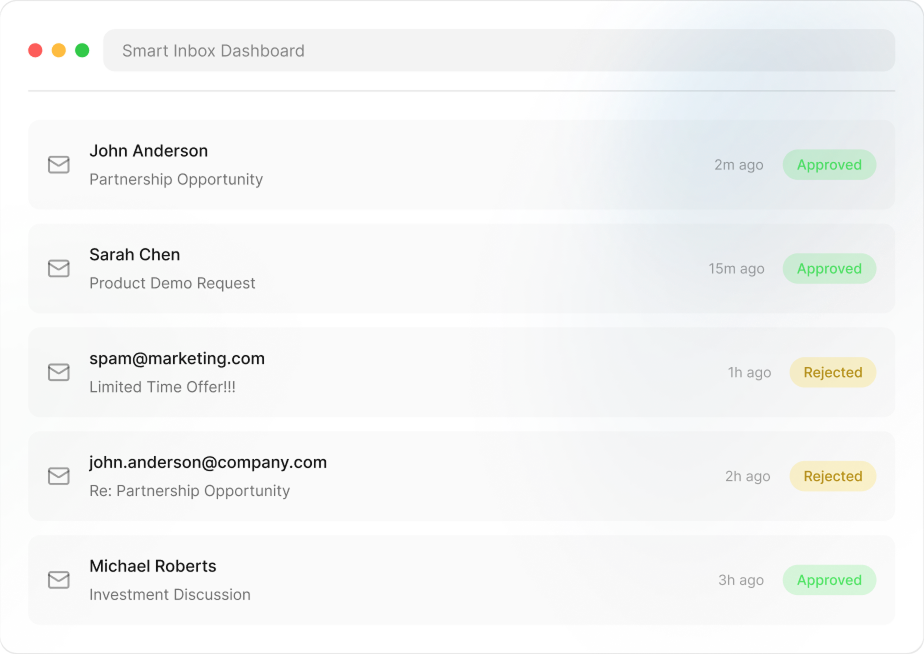
A large chunk of productive time goes into crafting responses, checking tone, and fixing unclear conversations instead of closing deals.
If you do not acknowledge clients on time, high-intent leads tend to lose interest or go to your competitors who are more responsive.
Manually replying to clients can lead to human errors with serious consequences. A slight shift in tone, missed context, and grammatical errors can hurt your reputation.

Inbox


Qualified Leads
Every accepted email is analyzed instantly and responded to as per the context, intent, and stage of conversation.
The system comprehends whether it is a collaboration request, pricing query, or negotiation pitch and crafts responses accordingly.
Once GuestPostCRM is activated, responses to all accepted incoming emails are generated automatically and are sent with zero human intervention.
Each incoming email is assessed deeply, beyond surface-level keywords to find the actual intent behind every email.
If an email is related to guest post and link insertion and passes through filtration stage, it is accepted and enters the conversation stage.
Based on whether the sender is categorized as brand or non-brand, an appropriate first reply is generated, scheduled, and sent after a specified time.

Using the “AI Reply” button, you can send an instant response to the client at every stage of the deal. The message is editable so you can tweak it accordingly.

The system identifies the intent behind the email—whether it's pricing, collaboration, inquiry, or negotiation and crafts the response accordingly.

To activate AI reply buttons in your email thread, you need to turn on “Superfast Reply” toggle visible on the top-right corner of your screen.
Without crafting replies, you can shape conversations. Ask the client’s budget, negotiate prices, re-generate responses, and decline deals with one-click responses.
Every qualified email is assessed, and an appropriate response is generated instantly. You do not have to wait for the system to generate a response. This ensures that you can reply to the client in a timely manner without any delays.
Every qualified email is assessed, and an appropriate response is generated instantly. You do not have to wait for the system to generate a response. This ensures that you can reply to the client in a timely manner without any delays.
GuestPostCRM promises minimum manual effort. You need to customize response rules once. The system then creates professional and strategic responses without manual effort. You can shape deal progression with one click replies.
Using the powerful sender motive detection, the system understands the intent behind every email. This helps in crafting intelligent and contextually relevant responses tailored to the conversation stage whether it is inquiry, pricing, or negotiation.
Since a centralized prompt is generating all responses, you see a uniformity in quality, tone, and structure across all communications. Regardless of sender, volume of inquiries, and deal stage, responses are always focused and professional.
Timely acknowledgement of first-time clients is extremely critical. In GuestPostCRM, a first reply response is generated according to the chosen template as soon as the email passes the filtration stage. It makes you more responsive without any manual effort.
You can monitor the entire email thread in your GuestPostCRM. You can also check whether the reply was scheduled and when it was sent in your timeline. Creating an AI summary also provides you with a complete overview of the thread.
The system instantly creates, schedules, and sends first response to qualified emails, removing delays, and improving engagement from start.
If you choose to manually reply to the client before the scheduled reply or follow-up, the system automatically cancels it and updates the timeline.
GuestPostCRM is an AI-driven decision maker. It utilizes smarter controls to decide what to say, how to negotiate, what tone to use, and how to move the conversation forward.
AI Response and automation are personalized as per the purpose of email whether it is pricing inquiry, collaboration request, or negotiation.
AI-generated responses are editable. You can easily review, tweak, or completely change replies before sending, ensuring total user control over deal progression.
As per your workflow, you can train the AI with custom response rules to define how it should respond, what tone it should use, and how replies should be structured.
Accuracy Rate
Saved Weekly
Better Leads
Processing Time
Join global teams automating their guest posting and link insertion management and investing their time and resources on what matters, closing deals.
Got questions? Go through these FAQs. Here, we have answered the commonly asked questions about this GuestPostCRM’s feature.
If you have specific questions about GuestPostCRM’s features, workflows, sign up process, or pricing,
feel free to reach out
via our
Contact Us page.
You can also email us at
[email protected].
A: AI Response and Automation in GuestPostCRM generates context-aware responses automatically without any manual effort. The system assesses the intent of the email, conversation stage, and sender type to create precise responses. This enables you to respond promptly, minimize manual effort, and proper conversations forward quickly.
A- The system assesses email content, recognizes intent, and chooses a predefined response strategy. After that, it creates a context-aware response that matches the specific stage of conversation.
A- Yes, you can edit the prompt and define the tone, rules, and structure of responses. The AI aligns with your configuration to make sure that the replies resonate with your workflow and communication style.
A- No. You can review and make changes to the AI replies before hitting the “Send” button. Only first reply emails are scheduled and sent automatically. Even in those, you have full control to customize the waiting time.
A- It makes sure that the first response to a qualified email is instantly sent, minimizing delays and improving engagement with potential customers.
A-Yes. You can see when the first reply, follow-ups, and reminders were scheduled and when they were sent in the timeline. You can also check the full email thread in the GuestPostCRM to review the deal from start to end. GuestPostCRM not only ensures transparency but also helps you gain insights to optimize communication strategies for future deals.

.png)
.png)