




.png)
.png)
In the guest posting industry, nothing impacts your revenue more silently—yet more frequently —than delayed or ignored payments. When you're running a “Write for Us” website or an agency that handles dozens of placements a day, even a single unpaid order can break the flow of your cash, your workload, and your trust with clients.
Most agencies try to manage follow-ups manually, switching between Gmail tabs, spreadsheets, and reminder notes, but this scattered approach almost always results in missed communications. Over time, these tiny leaks compound into real financial losses—sometimes without you even realizing it.
To solve this exact issue, GuestPostCRM offers a strict, automated, yet completely customizable payment reminder system. These reminders ensure:
- No unpaid orders slip through
- Customers are notified professionally
- You don’t waste time chasing payments
- Links are protected
- Defaulters are identified quickly
This automated structure eliminates the emotional labor behind asking clients for money, keeps communication clean, and ensures that your workflow is never constrained by a customer who has simply “forgotten to pay.”
Here’s everything you need to know.
1. The Three Automated Payment Reminders
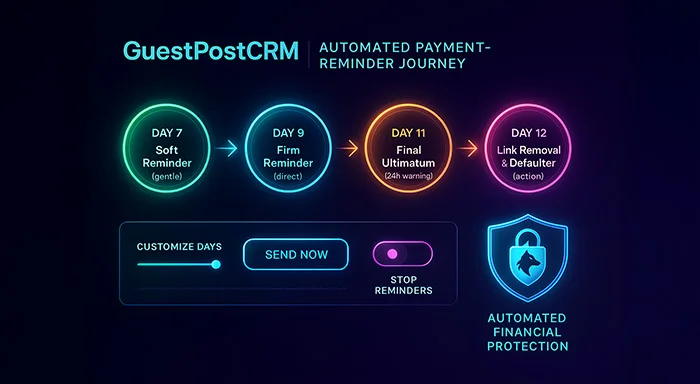
GuestPostCRM sends three auto payment reminders before marking a customer as a defaulter. These reminders run based on the duration of the unpaid order. The standard timings are as follows:
Day 7: First Payment Reminder (Friendly Reminder)
A soft, friendly payment reminder notification is sent to clients to politely remind them about their pending invoice.
For example:
“Just a gentle reminder—your payment has not come through yet.”
This payment reminder system portrays:
- The client forgot to pay
- The customer will pay soon
- It’s a small delay
GuestPostCRM interprets this delay as normal supervision rather than deliberate withholding of payment. Most genuine customers respond positively to this reminder because it doesn’t sound threatening or confrontational.
Day 9 Second Payment Reminder (Definitive Reminder)
This reminder becomes more direct and clearer, encouraging customers to take immediate action on the pending payment.
For example:
“This is your second reminder. Please make your payment to prevent disruption in service.”
With such emails, GPC emphasizes:
- The action is urgent.
- Need immediate attention
- Delays are impacting service
At this stage, GuestPostCRM shines in safeguarding your workflow. Many agencies benefit from a substantial reduction in payment delays because the message openly communicates urgency without sounding confrontational.
Day 11 → Final Payment Reminder (Ultimatum)
This is the last warning for customers to complete their payment; otherwise, their link will be removed after 1 day.
For example:
“Last reminder: You have only 24 hours to complete the payment. After this period, your links will be removed, and your account will be flagged as a defaulter.”
This is not just a reminder but also a formal notice warning the customer that:
- They have 24 hours of time duration
- Non-payment will result in specific action
At this stage, GuestPostCRM is definitive, open, and completely tailored to your financial security policies. Customers who still ignore payments after this point are often high-risk profiles, and the system prepares to take corrective action.
Also Read: Payment Gateways Fundamentals: Best 10 Payment Gateway Options You Must Know
Day 12 → Link Removal + Defaulter Marking
In case the customer still doesn’t complete their pending invoices, the payment reminder system will:
- Each unpaid link is removed from articles
- Mark the customer as a defaulter.
- All future services require 100% upfront payment
- They cannot place new orders
- Every other email address from the same IP also becomes a defaulter.
No exceptions.
This protects you from:
- Fraud
- Misuse
- Non-paying buyers
- Multi-account scammers
This automated enforcement is what most “Write for Us” site owners manually struggle with. GuestPostCRM removes the burden of deciding when to take action by applying rules consistently and instantly—preventing emotional hesitation or delays in removing unpaid links.
2. Can You Customize Payment Reminders?
Additionally, GuestPostCRM offers full customization in payment reminders, giving you complete control over how and when clients receive follow-ups. If you prefer not to use this feature at all, you can simply skip reminders entirely. If you want a quick configuration, the system offers default reminder settings that work out of the box. And if your agency follows specific business rules, you can customize everything—from date & time to the number of reminders and the tone of each message.
- The reminder schedule
- The number of days
- The interval between reminders
- Whether the ultimatum should happen earlier or later
- Whether defaulter marking happens sooner or stricter
Every agency runs differently—GPC adapts to your workflow.
For example, some high-authority sites prefer a stricter 5-7-9-day cycle, while others who deal with long-term partners extend the period to 10-14-18 days. This level of flexibility ensures your reminders fit seamlessly with your workflow, helping you maintain professionalism while making on-time payment easier without any manual effort.
3. Can You Cancel or Stop Reminders?
YES—you can cancel reminders manually.
The customer has paid
- The issue is resolved
- you have a special agreement
- You don’t want to send further reminders
You can manually stop or pause reminder flow. GuestPostCRM gives you complete control. This manual override is extremely helpful when dealing with loyal customers or long-term partners who may have temporary payment delays but deserve personalized handling.
4. Can You Trigger Reminders Immediately?
YES — every reminder has a “Send Now” button. Even if the customer is on Day 3 or Day 5 or Day 8, you can manually click:
- Send First Reminder
- Send Second Reminder
- Send Final Reminder
The GuestPostCRM’s payment reminder system is extremely useful when:
- You want to speed up payment
- The customer is wasting time
- The link has high traffic and must not be used unpaid
- You need proof of communication
Instant triggers are one of the most praised features because agencies often need to escalate communication when they detect risky behavior early on.
5. What Happens After Becoming a Defaulter?
If the system marked a customer as a defaulter:
- All services are frozen
- They may not place new orders.
- Only upfront payments are allowed
- They cannot negotiate unpaid deals
- All accounts using same IP also become defaulters
This is how GPC protects you financially. IP-based defaulter mapping is extremely powerful because it prevents fraudsters from using multiple Gmail accounts to bypass penalties — a common issue in guest posting.
6. Why This Reminder System Is Important
Here are a few reasons why GuestPostCRM’s reminder system stands out:
- Guest posting business has high risk of missed or delayed payment
- Customers often become unresponsive after link placement
- Fraudulent agencies attempt to misuse generosity
- Multiple email addresses lead to miscommunication
- Payment message may be overlooked
- Agencies face routine revenue leakage due to weak handling
GuestPostCRM helps businesses with a clear, strict, and automated payment reminder system. This is like a wolf watching your payments.
In simple words, GuestPostCRM makes sure your financial pipeline never relies on memory, manual follow-ups, or luck. It transforms your payment process into a predictable, trackable system — something every “Write For Us” website desperately needs.
Conclusion
The payment reminder system of GuestPostCRM includes 4 major stages, like
| Day | Reminder | Purpose |
|---|---|---|
| 7th day | First Reminder | Soft notification |
| 9th day | Second reminder | Firm follow-up |
| 11th day | Last reminder | 24-hour deadline |
| 12th day | Action | Link removal and mark as defaulter |
This actually means:
- Days can be modified.
- Notifications can be cancelled anytime.
- Reminders can be triggered manually on demand.
- The system maintains robust security.
- Defaulters/IP-based defaulters are automatically restricted.
With this framework, GuestPostCRM eliminates revenue loss and provides agencies with the confidence that every requested guest post will be paid promptly, within time, and without irrelevant disruption.
FAQs for Payment Reminder
Q. Does the CRM alert users when a deal is going to expire?
A. Yes, GuestPostCRM sends 3 reminder notifications when a deal is 7 days and 24 days away from expiration. These reminders encourage teams to take immediate, manual action if required.
Q. Can I increase the expiration time of a running deal?
A. The system allows admins and legitimate users to manually extend the expiry date of an ongoing deal at any time.
Q. Can I reschedule the follow-up reminders after a deal is created?
A. Yes. You can completely customize the reminder templates inside your CRM settings. GuestPostCRM then uses your updated template version when sending automated reminders, guaranteeing consistent communication style and brand tone.



.png)
.png)