

%204.png) GuestPostMailer
GuestPostMailer





.png)
.png)
Since the Guest posting industry relies on timely payments to build strong customer relationships. But even a slight payment delay goes beyond mere inconvenience; it directly disrupts cash flows, link security, publisher collaboration, and sustained revenue resilience. From “Write for Us” website owners to agencies, they often deal with a repetitive pattern: customers send order requests, securely publish their links, and then withdraw communication. This often leads to payment delays—sometimes intentional, sometimes due to customers disappearing after receiving the deliverables, and sometimes due to customers attempting to exploit loopholes by switching email accounts.
This is where an innovative CRM solution—GuestPostCRM—comes into play. This platform is designed to resolve these common challenges completely. The Defaulter System in GuestPostCRM upholds clear, organized, and strict payment policies via AI automation. This allows agencies to eliminate the risk of lost revenue, prevents fraudulent clients from exploiting the system through multiple identities, and ensures that links do not remain active for unpaid buyers.
This blog covers a detailed breakdown of what the actual defaulter system is, how it works, and why the system implements firm payment discipline.
Payment Reminder System in GuestPostCRM
GuestPostCRM offers full customization in payment reminders, giving you complete control over how and when clients receive follow-ups before they reach defaulter status. If you prefer not to use automated reminders at all, you can simply skip this feature entirely and manage collections manually. If you want a quick configuration, the system offers default reminder settings that work out of the box with proven templates. And if your agency follows specific business rules or client communication standards, you can customize everything—from the exact date and time of each reminder to the total number of follow-ups and the tone of each message. This level of flexibility ensures your reminders fit seamlessly with your workflow and agency brand, helping you maintain professionalism while encouraging on-time payments without any manual effort or spreadsheet tracking.
GuestPostCRM offers an extensive reminder feature, which includes 3 soft as well as firm reminder templates. Moreover, these reminders are business-friendly, yet strict enough to maintain payment discipline. This advanced structure is designed to send timely payment reminders to the right clients at the right time—automatically, thereby eliminating the need for manual follow-up.
1. First Payment Reminder—Polite but Professional
This gentle reminder template is sent to aware customers about a pending payment that can be forgotten accidentally. The message tone, however, is soft, polite, and informative:
“Just a friendly reminder to notify you of your pending payment. We will really appreciate it if you could process it at your earliest convenience.”
It simply informs the buyer about their delayed payment without creating pressure.
2. Second Payment Reminder—Clear & Assertive
If payment is still unpaid after the first reminder, the system considers the delay intentional or careless. The message maintains a clearer and more firm tone:
“Your payment is overdue. Immediate attention is required to prevent service interruption.”
It creates a sense of urgency while maintaining professionalism.
3. Final Reminder—The 24-Hour Ultimatum
This is the final reminder template sent to customers if the payment is still pending before enforcement begins. The aim is to inform clients that they have only 24 hours to complete the payment. In case the deadline is missed:
- Unpaid links will be removed
- The sender will be flagged as a defaulter
- Access to services will be blocked
“Final reminder: Complete the due payment within 24 hours. Failure to comply will result in link removal and blocking of future services.”
After this reminder, the buyer understands the seriousness of non-payment and the consequences that follow.
Next Steps After the Ultimatum
If payment remains unpaid even after the 24-hour deadline, the GuestPostCRM-integrated automated system instantly takes proactive steps. These actions ensure you protect your revenue, avoid exploitation, and ensure fairness for high-potential buyers who adhere to proper payment timelines.
Here are the consequences after the timeline:
- The Buyer Is Flagged as a Defaulter: This status persists until the payment is manually resolved.
- All Unpaid Published Links Are Removed: This step protects your website, and collaborative publishers stay protected from unpaid placements.
- Communication Records Are Maintained: The complete timeline of reminders and conversations is precisely stored in your CRM for transparency and accountability.
- All Designated Services Are Suspended: All outstanding orders, deals, or revision requests are terminated to ensure compliance.
What do you Mean by "defaulter system" in GuestPostCRM
A defaulter doesn’t mean someone who has not paid due payments. Meanwhile, it is someone who:
- does not adhere to agreed payment timelines,
- overlooks three consecutive payment reminders,
- attempts to bypass the process of using multiple accounts,
- tries to continue communication or negotiation with unsettled dues.
If someone becomes a defaulter, the system implements firm workflow limitations to mitigate the risks of future losses.
All Services Are Disabled
The defaulters are not able to access revisions, negotiations, support, and new placements. The only way to continue services is 100% upfront payment.
They Cannot Place New Orders
Until previous dues are cleared, the customer cannot place a new order, as CRM automatically blocks non-payment buyers.
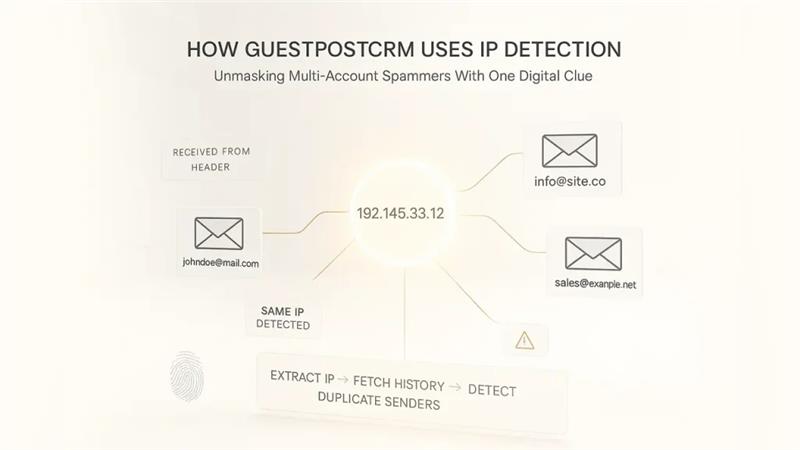
IP-driven Multi-Account Blocking
This feature is one of the most powerful fraud prevention tactics. When the same buyer attempts to:
- build new identities after being defaulter,
- use several email accounts,
- impersonate a different person.
The advanced defaulter system in GuestPostCRM automatically detects identical IP addresses and flags all associated accounts as defaulters. This guarantees that fraudulent buyers cannot circumvent consequences by switching email addresses.
Why Defaulter System Is Essential
If agencies do not follow strict enforcement, they often face:
- Erosion of publisher trust
- Multi-account scam
- Unpaid active links
- Unfair negotiation practices
- Fraudulent buyers are wasting time
- Excessive follow-ups
- Disrupted revenue flow
GuestPostCRM eliminated all these risks completely by creating a payment environment that is transparent, expected, and enforceable. This enables genuine buyers to leverage smooth service while fake or non-compliant clients are automatically screened out.
How Defaulter Status Can Be Changed
The defaulter system in GuestPostCRM is strict, but it is also fair. If the buyer pays their pending amount, you can restore their normal status with a single click. Also, there are no penalties and hidden restrictions—just clean restoration once payment is cleared.
Final Verdict
The Defaulter System in GuestPostCRM helps your business solve repetitive problems, including unpaid placements, fake buyers, and multi-account fraud. Let’s understand the complete process in brief:
- Sent three payment reminders, and the final one gives a 24-hour ultimatum.
- If payment is still unpaid, the system removes links automatically.
- Marks the client as a defaulter.
- They now cannot place new orders.
- And all services are suspended.
- Only advanced payments are accepted.
- IP-based tracking blocks multi-account exploitation.
By following clear payment disciplines, GuestPostCRM safeguards your workflow, publisher trust, revenue, and sustained stability—while ensuring only authentic clients always experience seamless, hassle-free service.
FAQs for Defaulter System in GuestPostCRM
Q. Is there a separate list for defaulters?
A. Yes. GuestPostCRM automatically creates a Defaulters List within the Ledger module. Any client who fails to clear their dues is instantly moved to that list, keeping your record clear and accurate.
Q. Am I notified when a client is marked as a defaulter?
A. Absolutely. The defaulter system in GuestPostCRM instantly sends you an instant notification when a client crosses the defaulter threshold. This allows you to take preventive steps quickly to prevent further losses.
Q. Can defaulters continue placing new orders?
A. By default, defaulters are suspended from placing new orders. The only way is to clear all outstanding dues, protecting you from repeating transactions with fraudulent clients.
Q. Can manually changing a client’s defaulter status be allowed?
A. Yes, but only if the situation is fixed. You have full control to manually change or remove their defaulter status. The system provides you with flexibility to override automatic detection when required.
Q. Can the system automatically flag unpaid clients?
A. Yes. GuestPostCRM spontaneously identifies and marks clients when their payments pass the overdue threshold. It eliminates the need to manually track pending invoices—the system does it for you.


.png)
.png)
.png)
.png)