

%204.png) GuestPostMailer
GuestPostMailer




.png)
.png)
Guest posting teams work at lightning speed. The problem is that their inbox is always faster than they are. When numerous orders, follow-ups, and client emails hit the inbox throughout the day, it becomes slightly complex to monitor and be informed about things at any given moment. This is exactly where GuestPostCRM Live View plays a crucial role, ensuring vital features specialized to provide immediate visibility into all incoming emails without waiting for humans to provide manual updates or refreshes.
Live View (also known as the wolf mode) makes sure that you always remain informed about what is arriving in your inbox at the exact moment it arrives. It greatly helps link-building agencies, write-for-us websites, and online publishers stay in complete control and react quickly.
What Is the Importance of Live View?
Email forms the core of all guest post communication. Unfortunately, conventional inboxes were not created for real-time oversight, especially if:
- Multiple clients are simultaneously sending inquiries.
- Guest post orders require instant attention.
- It is important for the agencies to monitor live conversations and avoid losing opportunities.
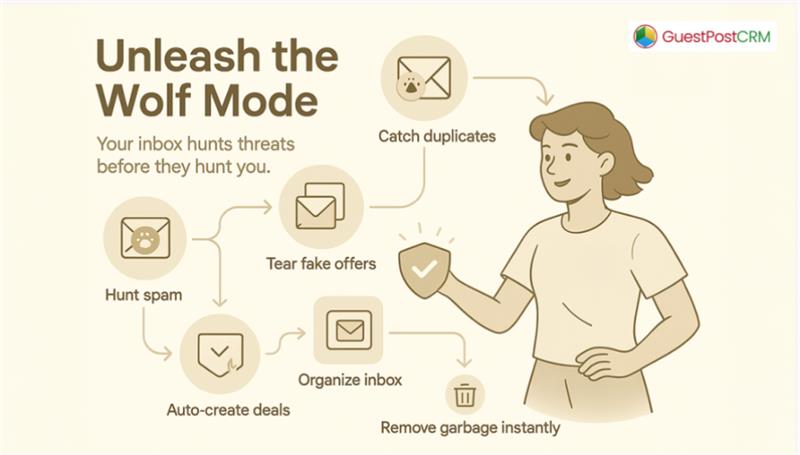
As you know, due to tight competition in the guest posting business, even waiting a few minutes to refresh the inbox manually can potentially lead to missed messages, order delays, or slower decision-making. This can impact your deals, make you lose your opportunities, and damage your reputation. Noticing this gap, GuestPostCRM has come up with a Live View—an elegant way to remain updated on inbox activity without making any effort. We call it the wolf mode because it hunts for fake offers, duplicate senders, and spam like a wolf and protects your inbox.
What are GuestPostCRM’s live shows?
Live View indicates every incoming email the moment your connected inbox receives it. There is no need to click on the refresh button. Jumping back and forth between your inbox and CRM is also not required. This allows teams to track communication easily and respond in a timely manner.
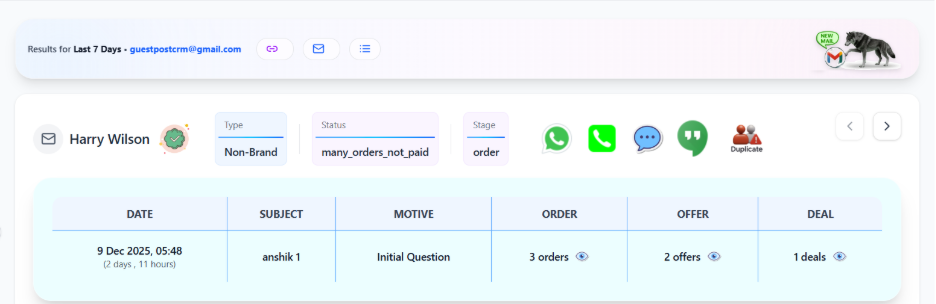
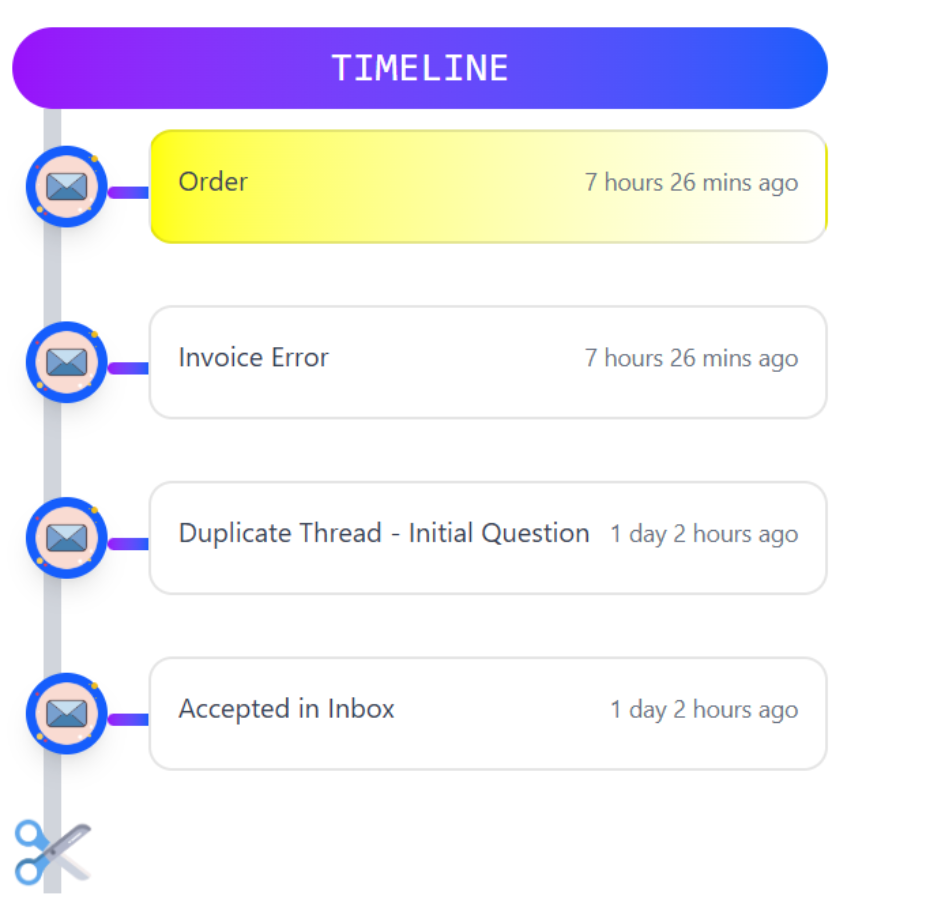
Courtesy of this advanced real-time display, users get:
- A user-friendly dashboard that displays all of their incoming emails.
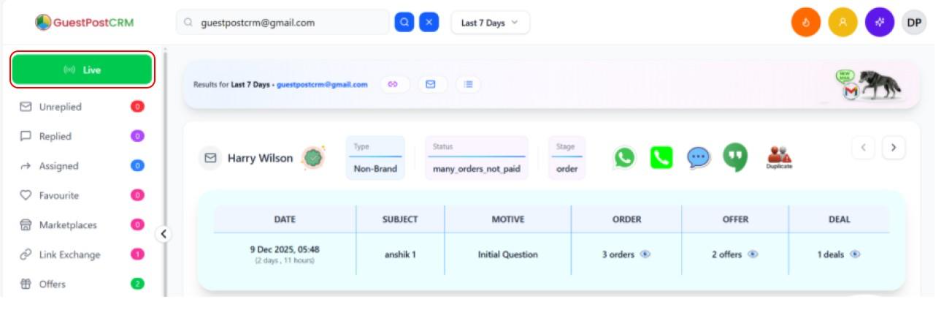
- Instant information on the name of the sender, date, subject, motive, order, offer, deal, type, and status.
- A visual timeline that shows the entire history of interactions.
- An efficient way to view all inbound mail and gain insights on the sender.
The live view of GuestPostCRM is not about automation; it is about giving clarity to the business. And in guest posting workflows, clarity saves you a lot of time and enhances revenue.
A Right Option for Teams Managing High Email Volume
If your inbox receives countless messages every day, staying up to date with them can feel like a daunting task. Live View works like a transparent window that gives you insights into everything happening behind the scenes.
It specifically helps with:
- Monitoring active guest post leads.
- Filtering key messages from general inquiries.
- Ascertaining timely responses for each client.
Instead of hopping between various tabs or waiting for your email client to synchronize, you can remain aligned with the flow of communication effortlessly.
How Does Live View Help with Quick Decision Making?
To take the right decisions, you require a higher visibility. Live View provides you with exactly this.
Here is how it enhances your daily processes:
- Immediately Recognize Opportunities:
When someone requests terms, prices, or links, you see them immediately.
- Prevent Missed Emails:
There is no need to worry about messages or delays getting buried somewhere.
- Be vigilant on client activity:
When a client responds to an existing thread, you get instantly informed.
- Ensure momentum:
When approvals, follow-ups, or payment inquiries come in, you can respond more quickly.
Keep in mind that even a few minutes of delay can make the difference between a deal made and a deal lost. Live View completely removes the friction.
The Right Way to Remain Updated
Live View does not need any complex setup or special settings. It is established to naturally blend into your workflow. Users can freely click on the Live View button (see the image) to see the latest update whenever required. Consider it like a dashboard that provides you with real-time details.
This is valuable especially when:
- Managing peak guest post order days.
- Tracking campaign responses.
- Handling numerous clients at once.
- Overseeing communication within the team.
Instead of manually checking email again and again, the system directly brings updates to you.
Live View Is a Simple Feature That Ensures Maximum Impact
Though it looks quite simple on the surface, Live View remains one of the most useful features inside GuestPostCRM. It enhances responsiveness, awareness, and confidence, three things that every guest posting team requires.
When you are aware of new incoming messages, you naturally become more effective and make quick decisions. You can prioritize your tasks much better. You can also respond without any delay. And more significantly, you will never lose a client because of late replies.
The in-built Live View of GuestPostCRM improves your workflow, providing link-building agencies, write-for-us websites, and online publishers the clarity they require to efficiently operate.
FAQs for GuestPostCRM Live View
Q1. What is the importance of GuestPostCRM’s Live View?
A- It showcases each inbound email in real-time without needing a manual refresh.
Q2. Do I need to click on any button to enable Live View?
A- No, it automatically works when the connection between your GuestPostCRM and inbox is successfully established.
Q3. What does GuestPostCRM’s Live View show?
A- It shows the name of the sender, receiving data, business type (brand or non-brand), motive, status of offer, order, and deals, etc. It also shows a detailed timeline in GuestPostCRM that shows the progress and history of the current deal. You also get buttons to contact clients through phone, WhatsApp, Google Hangouts, etc.
Q4. Does Live View replace my inbox?
A- No, it just shows you the details of the incoming emails so that you can track them quickly.
Q5. Why is real-time email visibility significant?
A- This is because gaining real-time insights in a simple way aids in securing more deals and avoiding missed opportunities.


.png)
.png)
.png)
.png)