

%204.png) GuestPostMailer
GuestPostMailer





.png)
.png)
Want to redesign your website but worried about search engine ranking? Giving a fresh, compelling look can help improve site appearance, user experience, and conversion rate. Additionally, integrating advanced functionality and adding up-to-date content can drastically improve your overall SEO performance. While redesigning a site is a vital step, it can affect your site’s ranking, traffic value, and organic search results.
This is why a proper technical strategy is crucial when attempting to redesign a website and eliminate the risk of “manual penalty”, regardless of whether you have a team of experts. But don't worry—this guide will walk you through a comprehensive website redesign SEO checklist that will assist you throughout the process while retaining your search visibility.
What is Website Redesign?
Website redesigning is the process of updating and improving different aspects of a website, like UI, content, structure, functionality, and user experience, to align it with current business goals. With this process, you can relaunch your brand by updating your brand name, refreshing legacy content, introducing new features, and improving the user interface. The goal is to modernize the site to make it look appealing and function effectively to drive engagement, improve conversion, and boost ROI.
How is It Impacting SEO?
Imagine this: Your website has existed for months or maybe years and has a higher domain authority and stronger contextual relevance. Google already understands your site’s structure, content, and niche, resulting in strong SERP ranking, flowing organic traffic, and rapid conversion of qualified leads. Then, you relaunch your site by redesigning it with modern requirements, but your online visibility suddenly falls by 90%. Unfortunately, this kind of nightmare occurs far more often than you'd expect.
While redesigning a site leads to numerous benefits and has many objectives, this process can hinder your existing SEO performance. Search engines like Google rely on advanced algorithms to detect changes in website ranking. A quick website redesign without focusing on SEO health can jeopardize your recognized brand trust signals, waste crawl budget, and disrupt PageRank allocation.
Additionally, implementing proper local SEO strategies is crucial, especially for businesses seeking a local search presence for their site. This is the ultimate reason for implementing a strong SEO website redesign tactic. The guide covers an ultimate website redesign SEO checklist that helps you in softly relaunching your site without even a single negative impact. Let’s understand them briefly.
Also Read: Programgeeks Social: Connect, Learn, and Grow Your Programming Career
Website Redesign SEO Checklist for 2026
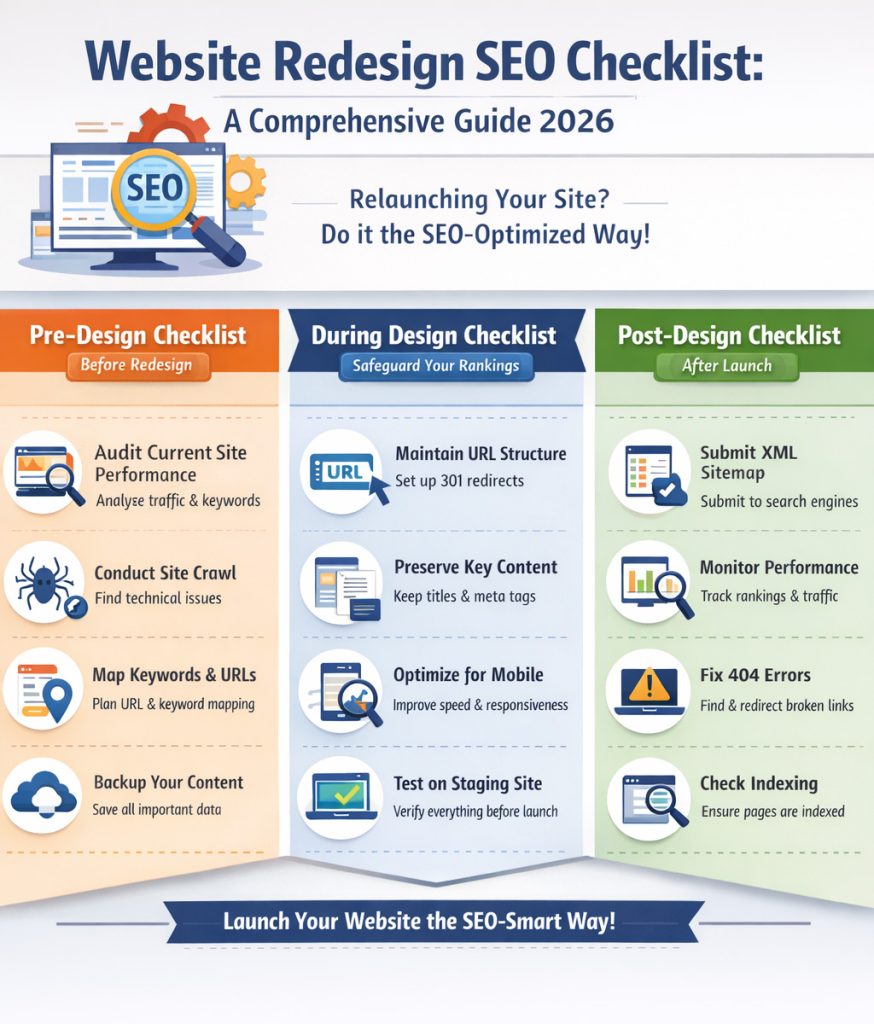
In the redesigning process —before, during, and after — keep certain factors in mind to get optimal results. The checklist is grouped into 4 parts based on the process lifecycle; each tactic contains a significant value to mitigate negative consequences.
Phase 1: Pre-Design Stage
1. Analyze Your Current Search and Website Performance
This is the first and most crucial step of this procedure, as this will let you know the current performance of your content on SERP. Creating a comprehensive foundation is necessary before changing a single line of code. These metrics help you determine the post-launch success or define the common challenges that need immediate attention.
Things to measure:
1..Set up Google Analytics and Google Console for your current site and export 12-18 months of data, including
- Organic traffic on each page,
- Landing page performance,
Goal completions, - Bounce rates,
- Conversion paths,
- Total number of backlinks.
2. Organize keywords that rank, impressions, click-through rates (CTR), and top SERP positions using Google Keyword Planner and Google Search Console
3. Create a list of top-performing pages based on organic traffic, conversion rate, and engagement metrics.
4. List down pages having the strongest backlink profiles and greater referring domain authority using the SEMrush Backlink Audit Tool.
Platforms to use: Google Search Console, Google Analytics 4, SEMrush, Ahrefs, or Moz
With this information, you can access all the data required to generate lasting results after your redesign. There may be some pages that you need to remove or update, like products or services that you no longer provide.
2. Perform a Comprehensive Site Crawl
Conduct a complete technical audit to identify all existing issues that shouldn't move to the new site using crawling tools, like Screaming Frog, DeepCrawl, or Sitebulb.
What to evaluate:
- XML sitemap coverage and precision
- Redirect chains, loops, and temporary redirects that you want to keep permanent
- Redundant content issues and canonical tag deployment
- HTTP status code errors, including 404, 410, 500, 503 responses
- Duplicate or missing metadata, title tags, or meta descriptions
- Measure page load times and server response speeds
- Isolated pages without inbound internal links
Pro tip: Store this crawl information in a safe place, as you'll need it for post-launch comparison and to build your redirect map.
3. URL Structure & Keyword Mapping
URLs help identify the exact locations where particular data resides. They act as anchor text and a crucial ranking aspect that helps crawlers analyze the content and index a website. When redesigning a website, keeping the URL structure consistent and maintaining internal and external link equity is more essential than ever. Otherwise, a broken link can cause a 404 error, encouraging users to jump to another website.
Map keywords to their associated URLs. This step mitigates the risk of keyword cannibalization and ensures nothing is overlooked during migration.
Document the following for each important page:
- Primary focus keyword
- Current search result position
- Monthly search volume
- Meta title and description of each page
This will create a website redesign blueprint to keep SEO performance and search engine ranking intact with the older URL while accessing the newer version.
Phase 2: During Redesign Stage: Safeguard Your Rankings
1. Maintain URL Consistency (Where Possible)
Use this golden rule: Identify URLs that rank well for a specific keyword, log them, and don't update unless absolutely required. Unnecessary URL changes lead to technical debt through redirect complexities and jeopardize search engine rankings. But, if you decide to create a new URL for any page, set up 301 redirects for users and search engines to jump directly from older URLs to new ones. And if you remove a page from your site, you don’t need to redirect it elsewhere since the information it contains is no longer available.
Best practices to adhere to when changing URLs are crucial:
- Create simple, short, and a little descriptive
- Insert target keywords naturally
- Align them in a logical hierarchy (i.e., example.com/category/product)
- Use hyphens instead of underscores to separate words
- Prevent creating deep subdirectories—stick to 3-4 levels at most
2. Preserve Authentic Content
Make sure that redesigning does not hinder your important ranking signals. Keep an eye on these website redesign SEO elements while designing your new site:
- Title tags: Must be 50-60 characters with a focus keyword at the beginning.
- Image alt text: Alt attributes should be descriptive and keyword-focused
- Header tags: Maintain a H1-H6 hierarchy where one H1 must be on each page
- Internal links: Contextual URLs with natural anchor text
- Meta descriptions: written within 150-160 characters with intuitive, keyword-rich copy
Create a title, alt text, meta description, and content the same as the old, high-ranked pages contained. Or you can make new titles and meta descriptions for new pages as well.
3. Optimize Page Speed for Mobile
Google prioritizes mobile-first indexing and treats page speed as a crucial ranking factor, helping to provide a better user experience. When you redesign your site, it should outperform in both areas:
Mobile Enhancement:
- No disturbing pop-ups on mobile
- Responsive design that fits all screen sizes
- Understandable text without zooming, minimum 16px
- Touch-friendly buttons, 48×48 pixels minimum
Speed Refinement:
Optimized images with compression and use modern formats (e.g., WebP)
Minify CSS, JavaScript, and HTML for leaner code
Enable browser caching and compression
Target Core Web Vitals thresholds (LCP <2.5s, CLS <0.1)
Pre-Launch: Final Assessment
1. Set Up 301 Redirects and Canonical URLs
This step plays a most critical role in an effective website redesign SEO checklist. Establishing 301 redirects helps search engines know that a URL has shifted permanently and ensures a 90-99% chance to preserve ranking power to the new location. If more than one page targets the same keyword and content, adding the rel=” canonical” tag helps search engines determine the actual, master page and display it.
Steps to execute:
Make a redirect mapping spreadsheet, list all old URLs that need to change, and map them to their associated new URL (or relevant page if deleted). Focus on pages that have higher traffic and backlinks, ensuring each redirect runs as expected before relaunching your site.
Essentials to consider:
- Never redirect everything to your homepage (it looks spammy)
- Avoid redirect chains (A → B → C)
- Use 301 (permanent) instead of 302 (temporary) redirects.
- Deploy at the server level (.htaccess, Nginx config, or via plugins)
Common platforms to use:
- WordPress: Implement redirects using the redirection or Yoast SEO plugins
- Other: Set up redirects via .htaccess (Apache) or nginx.conf (Nginx) files
2. Update Your XML Sitemap
Your XML sitemap helps search engines understand your site structure and which pages to prioritize.
Before launch:
- Remove all outdated or deleted URLs
- Include new URLs that you want indexed
- Verify the XML syntax
- Keep it under 50,000 URLs per file
- Prepare to submit to Google Search Console immediately after launch
3. Check Robots.txt and Meta Tags
Double-check that your robots.txt file and meta tags won't accidentally block search engines.
Verify:
- No "Disallow: /" blocking your entire site (a common staging site mistake)
- Important pages aren't marked "noindex."
- CSS and JavaScript files aren't blocked
- Your sitemap location is referenced
4. Test on Staging Environment
Thoroughly test your site's performance, ranking factors, and UI design before launching. Create a staging environment and review everything throughout the website redesign SEO preservation process.
Testing checklist:
- All 301 redirects are permanent and work correctly
- Detect broken links, whether internal or external,l and remove them
- Forms and conversion monitoring function effectively
- Mobile responsiveness among different devices
- Page speed should match targets
- Analytics and tracking codes are deployed
- SSL certificate is set up
Post-Launch: Monitor and Improve
1. Submit Your XML Sitemap Quickly
Submit your new, updated XML sitemap to Google Search Console and Bing Webmaster Tools for seamless crawling and indexing of the new site. Once launched, focus on indexing pages quickly through URL inspection tools and also be sure of any errors and warning signals.
For this, you can:
- In Google Search Console, use "Request Indexing" for critical pages
- Check for crawl errors and warning signs
- Keep track of whether search engines process the new sitemap correctly
2. Monitor Your Performance Daily
After implementing all website redesign SEO checklist steps, ensure tracking of your redesigned website is crucial. The initial 2-4 weeks are important after your website is relaunched. Some ranking fluctuation is normal, but major drops need immediate attention.
Track these metrics:
- Organic traffic in Google Analytics
- Keyword rankings in Google Search Console
- Crawl errors and coverage issues
- Core Web Vitals performance
- Bounce rate and user engagement
- Conversion rates
3. Resolve 404 Errors Instantly
Despite having proper, well-defined planning, 404 errors can appear. Use Google Search Console's Coverage report to find them.
- When you find broken pages:
- Confirm if they should exist
- Set up 301 redirects to related alternatives
- Request re-indexing via Search Console
4. Check Indexation
Make sure all the crucial pages of your new site are indexed and accessible through Google crawlers.
Consistently check whether:
- Critical pages are visible in search results using "site:yourdomain.com"
- Outdated pages are being properly deindexed
- Your sitemap is actively being processed
- The coverage report has any unexpected errors
Conclusion: Boost Your SEO Performance
A website redesign acts as a major investment for your business. Improving site appearance is not enough to revamp it; you need to follow a proper website redesign SEO checklist to guarantee the investment return in good ROI instead of setbacks. By considering a few technical activities, including duplicate content, on-page SEO elements, XML sitemaps, and 301 redirects, you can preserve your site's visibility.
Key takeaways:
- Establish a performance baseline of your existing webpages before modifying anything.
- Maintain URL consistency to prevent broken links whenever feasible
- Implement thorough 301 redirects to ensure no client slips through the crack—it’s a mandatory step
- Asses everything precisely throughout the complete website redesign procedure before launch
- Keep track everything closely after launch for at least first 6 months
- Always stay connected with an SEO expert from day one, not as an afterthought
Perform these crucial steps accurately, and it will decide the success of your website redesign SEO health and performance. Adopt this checklist in your design workflow and focus on visibility factors throughout the process to relaunch a site that not only looks compelling but also ranks well on search engines.
FAQs About Website Redesign SEO
Q1. Does website redesign affect SEO?
Yes, redesigning a website without having a proper strategy can drastically degrade SEO performance. Setting up 301 redirects and maintaining SEO performance is critical, as it can risk losing rankings and organic traffic.
Q2. How to safeguard your SEO during a website redesign?
Keeping track of a few practices, including 301 redirects, on-page elements, URL structure consistency, and thorough testing before launching, can help protect your SEO performance.
Q3. What is the 80/20 rule in SEO?
The 80/20 rule highlights that 20% of your pages can generate 80% of your traffic. Focus on safeguarding these high-impact pages during website redesign.
Q4. How to redesign a website without losing SEO?
Create a performance baseline, set up 301 redirects, secure SEO elements, accelerate page speed, and test thoroughly after post-launch.


.png)
.png)
.png)
.png)