

%204.png) GuestPostMailer
GuestPostMailer




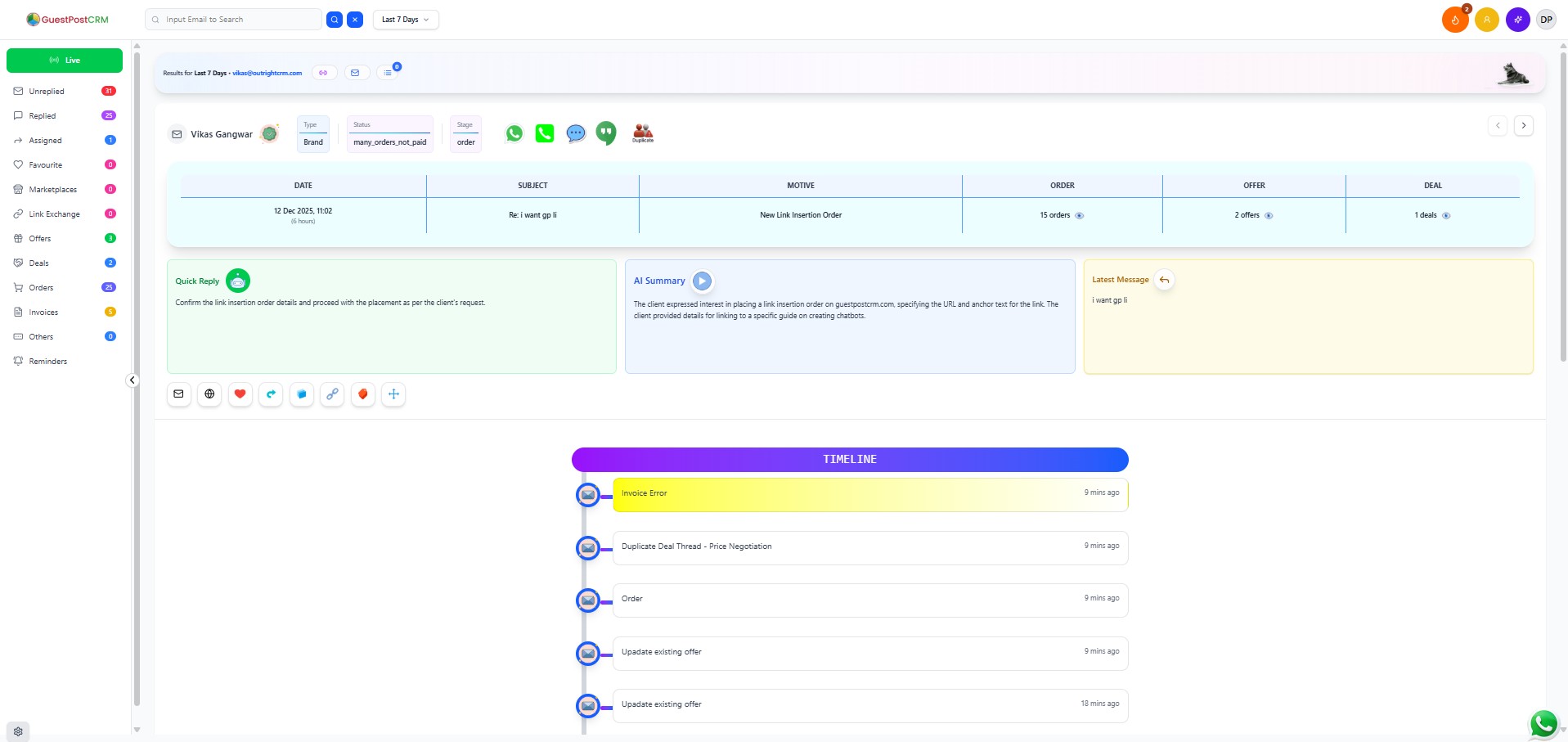
.png)
.png)
Managing guest posts and link insertion deals can quickly become complicated—multiple emails, reminders, negotiations, payments, updates, and communication threads happening all at once. Most CRMs are not built for this type of workflow, which makes the process even harder.
This is exactly why GuestPostCRM was built: to simplify, automate, and intelligently manage the entire workflow of guest posting and link insertion deals in one single platform. If you're searching for the best CRM for guest posting, you've come to the right place.
In this blog, we will explain:
- Why GuestPostCRM is the best CRM
- Why we built a fresh, user-friendly dashboard
- Why did we give unique names like Timeline View, Pencil View, etc.?
- A complete explanation of all 17 powerful features of the CRM
Let’s begin.
What Makes GuestPostCRM the Best CRM for Guest Posting
GuestPostCRM stands out because it offers something no other CRM provides at this level—a complete timeline-based view of every client interaction, combined with full automation, AI intelligence, and smart workflow management.
Here’s why GuestPostCRM is truly the best:
- Timeline View gives a stage-by-stage, time-based history of every deal—something missing in all other CRMs.
- AI-powered automation makes the system highly intelligent and almost self-operating.
- Smart Live Search finds anything instantly based on keywords, email, or contact.
- Customizable workflows allow users to control reminder timing, stages, and deal movement.
- A fully flexible UI helps users personalize their workspace.
- Omnichannel communication centralizes WhatsApp, SMS, email, and calls.
- Fraud detection via IP tracking makes the CRM safer and more reliable.
GuestPostCRM isn’t just software—it’s a smart, self-thinking system designed specifically for SEO deal management.
Why We Built a Fresh and Simple Dashboard
We designed the dashboard for the most important purpose: so that even a person with 0% technical knowledge can use the CRM easily.
Most CRMs are complicated, heavy, and confusing. But GuestPostCRM focuses on:
- User-friendliness
- Clean design
- Clear visibility
- Simple navigation
- Easy learning curve
Our goal was to make the best CRM for guest posting businesses so simple that even a first-time user understands instantly what’s happening.
Why We Gave Unique Features Names
We intentionally chose simple, meaningful, and sometimes fun names—because users should understand the feature just by reading the name.
- Timeline View → Shows everything by time
- Pencil View → Edit mode
- Live View → Real-time status
- Draft View → Auto-saved work
- Duplicate View → Repeated threads
The names are clean, memorable, and instantly understandable—making the CRM more intuitive and human-friendly.
Understand the Essential Features of GuestPostCRM
Below is a detailed explanation of each feature that makes GuestPostCRM the most advanced CRM for guest posting and link insertion workflows.
1. Timeline View—The Entire Dealing Journey on One Screen
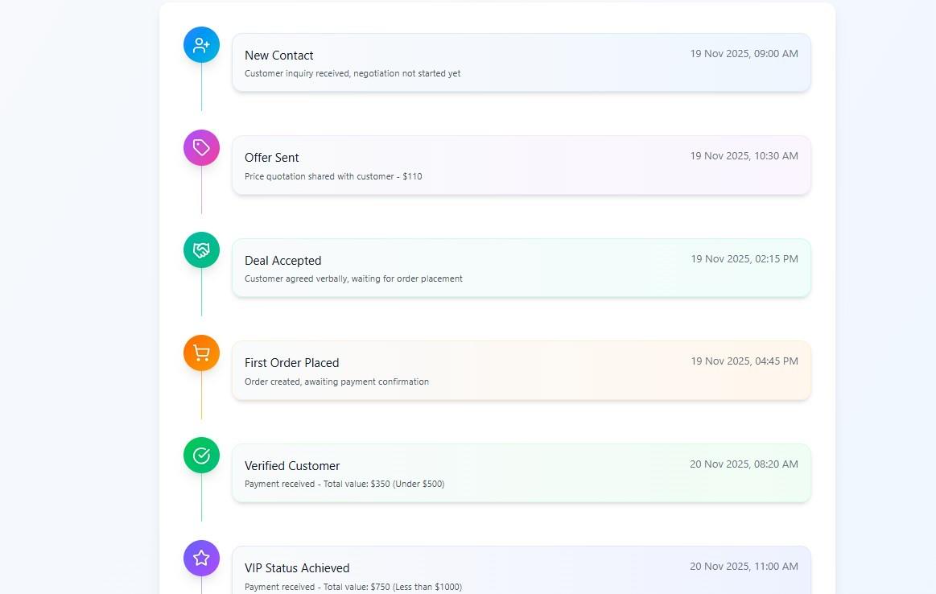
This feature organizes every action based on time.
You see:
- Emails
- Replies
- Reminders
- Notes
- Stage changes
- Activity updates
All displayed in chronological order. It gives a complete story of each client interaction—something no other CRM offers at this depth.
2. Pencil View – Editing Made Simple & Fun
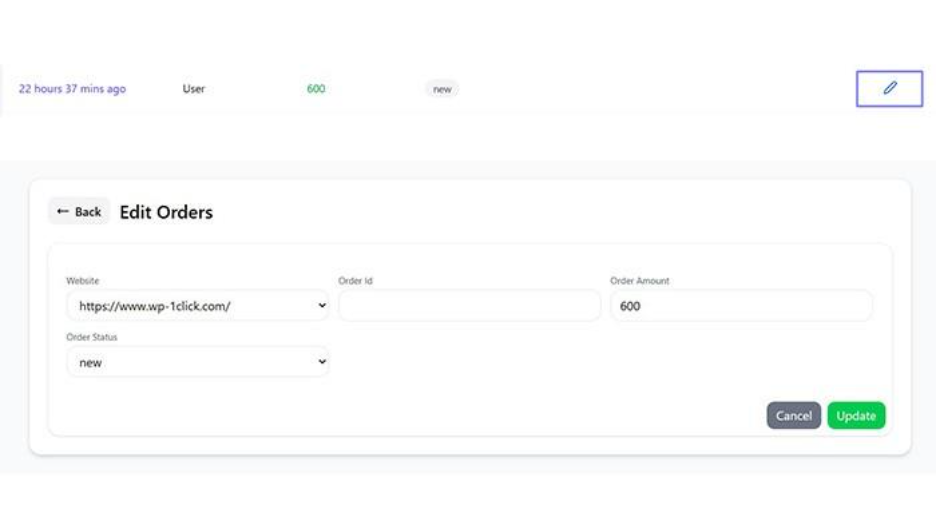
A playful yet powerful feature helps users edit everything instantly by simply clicking on the pencil icon. This aims to make the CRM feel friendly, modern, and easy to use.
3. Summarized Index View – 3 Views Combined into One
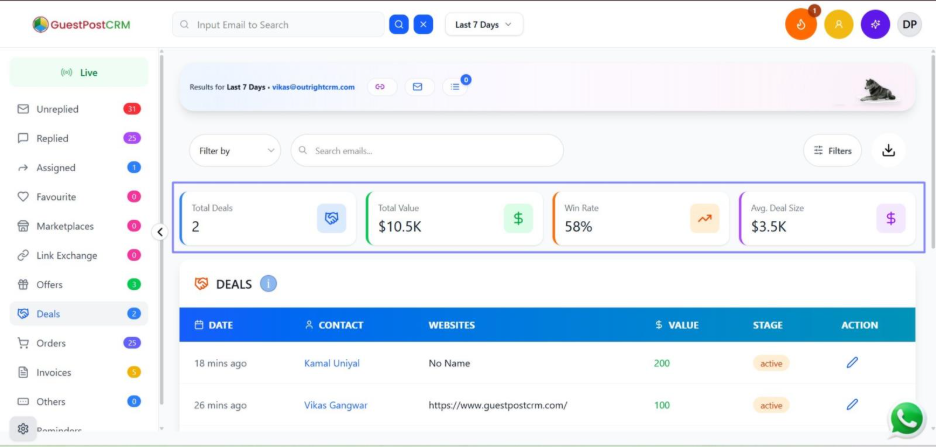
This innovative view brings together:
- List view
- Subpanel view
- Popup view
Plus summary cards at the top displaying key highlights. It's a compact dashboard for deep insights without switching pages.
4. Live View—Real-Time Activity Monitoring
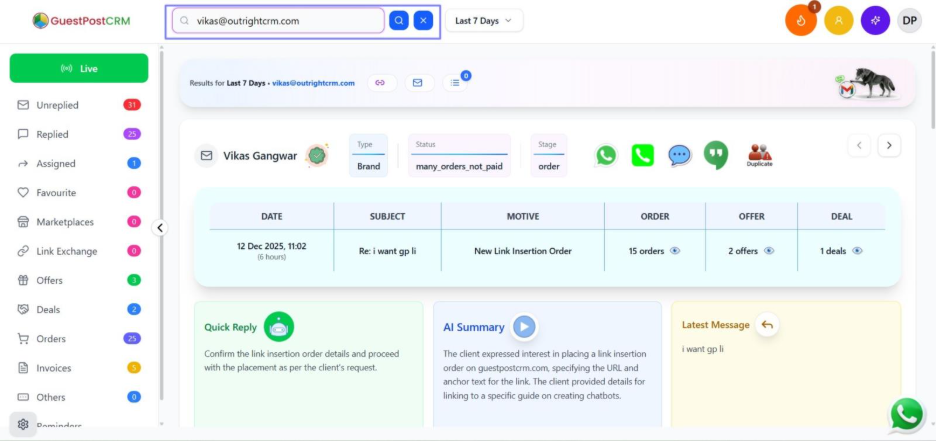
Shows what’s happening right now:
- Active deals
- Recent replies
- Ongoing activities
Perfect for fast-moving workflows and real-time monitoring.
5. Smart Live Search—AI-Based Instant Search
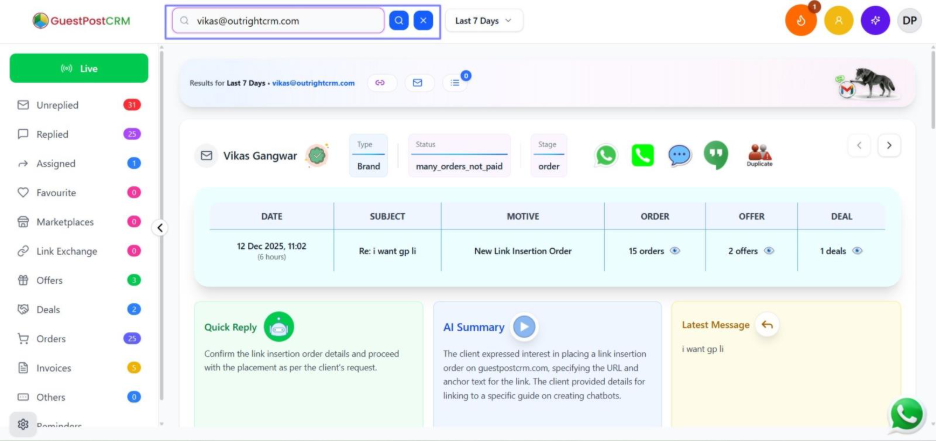
An intelligent search bar that finds:
- Keywords
- Emails
- Contact numbers
- External messages (if connected with Google or other services)
Example: Searching “Sameer” can also bring up related emails. This feature is not just a simple search—this is AI-based detection.
6. Omni-Channel Communication – All Messaging Inside One CRM
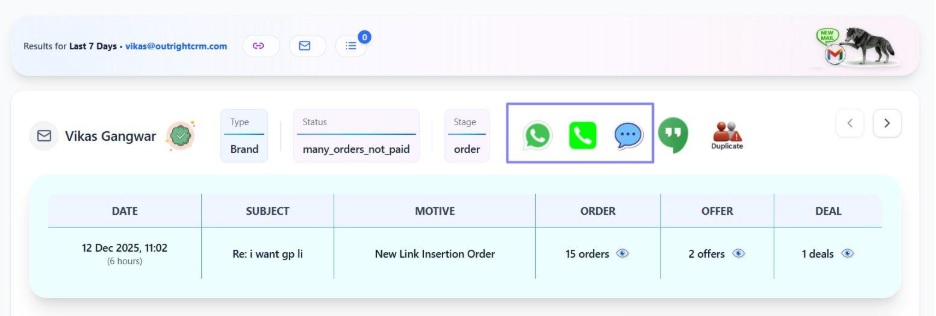
Communicate directly through:
- SMS
- Phone calls
Everything becomes centralized without needing to switch applications.
7. AI/Wolf-Powered Automation—The Brain of GuestPostCRM
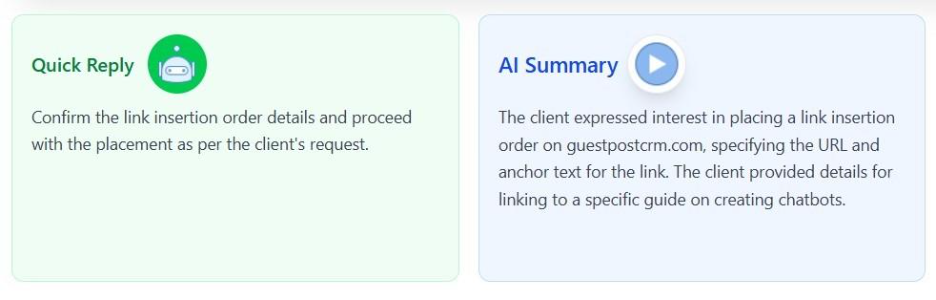
The widely known and best CRM for guest posting businesses acts like a wolf because it is:
- Powerful
- Intelligent
- Fast
- Self-operating
Think of GuestPostCRM as your smart AI assistant that automatically handles:
- Reminders
- Sorting
- Workflow movement
- Drafting
- Activity detection
8. Advanced Workflow—Customize Your Entire Deal Process
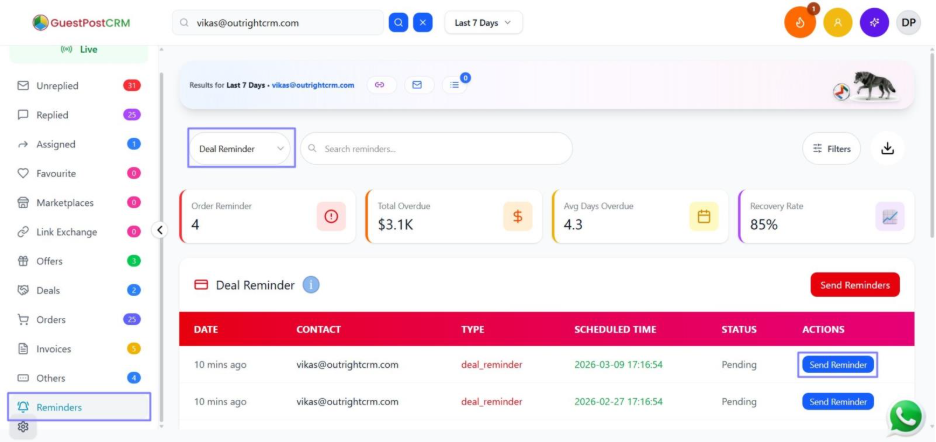
Default reminders:
- Day 7 → First Reminder
- Day 9 → Second Reminder
- Day 11 → Final Reminder
Users can change these timings to any number of days they want. The entire workflow is customizable—making GuestPostCRM adaptable to any business style.
9. Advanced Flexibility—Fully Customizable UI
Users can change:
- Branding
- Colors
- Layout
- Panel positions
- Display settings
The CRM becomes your personalized workspace.
10. Stage-Based Timeline – Structured Deal Movement
Every deal passes through stages. GuestPostCRM shows these stages neatly in a timeline format so users can see:
- Where the deal is
- What has happened
- What comes next
11. Natural API Integration—Expand Your CRM Easily
Users can integrate:
- PayPal credentials
- Twilio
- External tools
- Custom platforms
The API Keys section allows easy integration anytime.
12. Avatar – Smart Mini Assistant

A small avatar constantly updates users with:
- Recent activities
- Quick summaries
- Status updates
It adds friendliness and intelligence to the interface.
13. Actionable UI—Moves Work Forward Automatically
Example: You reply to one unread message, and the system instantly opens the next email.
This ensures:
- Faster work
- Fewer clicks
- Continuous workflow
14. Duplicate View—Automatically Detects Duplicate Clients
If a client tries to start a new thread while already being in a deal stage, the system:
- Detects the repetition
- Moves the new thread to the Duplicate section
This best CRM for guest posting sites helps mitigate confusion and unnecessary workload.
15. Draft View – Auto-Saving for All Unfinished Work
If a user starts typing but doesn’t finish or forgets to send, the CRM automatically saves it in the Draft View. However, it works for all sections—like a global auto-save feature, so that you never lose your work again.
16. IP Tracking – Smart Fraud Detection
If a person uses multiple emails from the same IP to start new threads:
- The system detects it
- Moves the user to the Defaulters section
This protects users from fraud, repeated fake leads, and misleading communication.
17. Notification System – Hot & Cold Notifications
GuestPostCRM delivers mainly two types of notifications:
Hot Notifications
Money-related updates:
- Payments
- Deal confirmations
- Revenue alerts
Cold Notifications
Everything else:
- Replies
- Workflow updates
- System alerts
This separation helps users prioritize important information instantly.
Conclusion: Why GuestPostCRM is the Future of Guest Post & Link Insertion Management
GuestPostCRM is more than just the best CRM for guest posting businesses—it is a smart, automated, AI-powered system specially designed for the needs of
- Outreach teams
- Link builders
- Guest post service providers
- Publishers
- SEO agencies
With a wide range of powerful features, unmatched timeline tracking, full automation, fraud prevention, and user-friendly design, GuestPostCRM stands out as the most advanced CRM ever built for this workflow.
If you're looking to manage deals effortlessly while maximizing productivity, clarity, and accuracy, GuestPostCRM is the tool you’ve been waiting for.


.png)
.png)
.png)
.png)