




.png)
.png)
If you want to grow your business online in today’s highly competitive world, managing customer relations efficiently is no longer optional; it’s essential. Establishing trust, maintaining consistent engagement, and providing personalized experience are the backbone of sustainable growth for any business. The digital landscape offers a wide range of digital tools and smart strategies to support this goal, with CRM tools leading the way.
However, many small businesses or startups with limited budgets often struggle to adopt these solutions. The good news is that you don’t need an enterprise-level budget to get started. Many CRM tools for small businesses are now widely available at minimal cost; in fact, most of them are completely free.
Regardless of whether you are a solo entrepreneur or leading a large team, the right CRM tool can help your business automate sales processes, enhance customer retention, and drive measurable growth. Stay tuned with this guide as it will walk you through everything you need to know about free CRM software available for small businesses in 2026.
Understand What Is CRM
CRM, also abbreviates as Customer Relationship Management, is a software tool that enables businesses to efficiently manage relationships with existing and potential leads. The system provides a centralized database system that stores contact records, monitors communication history, and simplifies deal management in real time.
CRM tools for small businesses utilize a single, centralized platform to manage all customer interactions, eliminating scattered spreadsheets, sticky notes, and email communication. This provides businesses with complete visibility into the customer journey, from contact creation to final sale, reducing the risks of missed leads.
If you are still weighing your options, this detailed breakdown of Spreadsheet vs CRM can help you decide which solution is the right fit for your business.
Advanced CRM tools have evolved far beyond simple contact storage. They now serve as dynamic hub that offers:
- Auto-scheduled follow-up reminders and customized email sequences
- Visual sales pipelines for simple and +simple and intuitive deal progress tracking
- Built-in integration across email, calendars, and third-party platforms
- Real-time reporting dashboards to track team performance and business growth
The global CRM market reached nearly $98.84 billion in 2025, yet almost half of businesses with small teams still haven't adopted yet, mainly due to extreme complexity and costs. The evolution of small business CRM tools directly fixes both of these challenges.
Essential Features of Small Business CRM Tool
All CRMs are designed differently for different specifications. Below are the key features that need to consider when choosing the correct CRM software for your business.
Lead & Contact Management
The primary feature of any CRM should be the ability to store, manage, and organize contact data in a very accessible way. To eliminate the manual efforts of your team, choose a system that automatically gathers leads via emails, web forms, and integrations.
Visual Sales Process
The CRM tools for small businesses allow teams to track the current status of every deal with a drag-and-drop Kanban-style pipeline. This is mainly beneficial for small sales teams who manage thousands of leads at once.
Email Integration
Many CRMs support two-way synchronization across emails or outlook to make sure that all email communication is stored in the CRM to record effortlessly. This completely removes the need to add and update client notes manually.
Task and Activity Monitoring
Automated reminders for follow-ups, calls, and meetings foster teams to stay productive. As a single missed follow-up can be an important cause for getting deals lost, a good CRM system can prevent this.
Analytics and Reporting
Small-business owners can make data-driven decisions with the help of even basic reports, such as team activity logs or transaction conversion rates. There are many CRM platforms that provide a dashboard level summary without taking any charges.
Integrations and Scalability
Correct AI CRM tools for small businesses evolve together with your workflow and team. Ensure if premium upgrade plans are affordable, and the system is compatible with your existing platforms, such as accounting software, email marketing software, or a help desk.
Top Free CRM Tools for Small Businesses in 2026
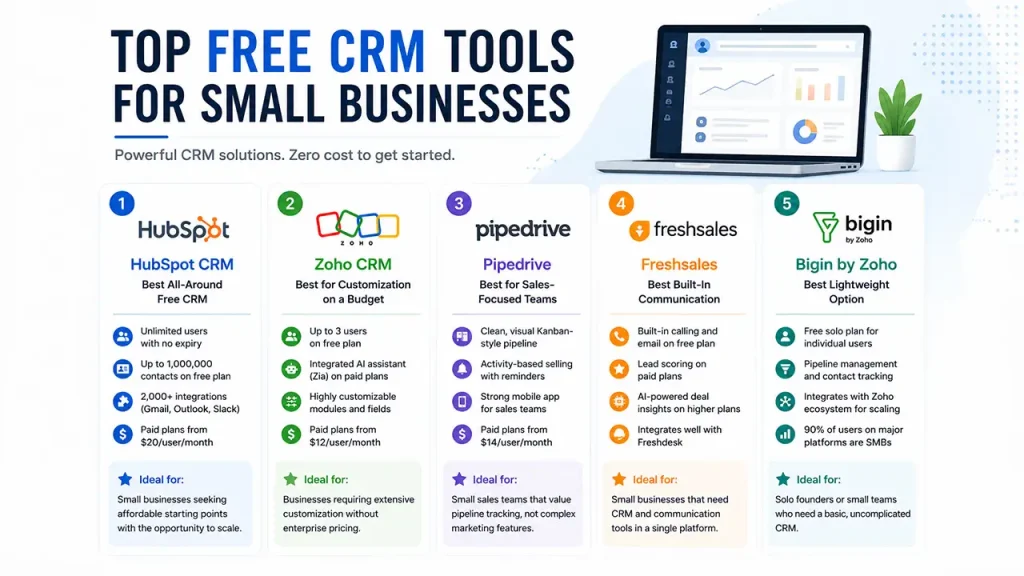
Looking for a CRM that won’t stretch your entire budget? Here are a few top choices small businesses rely on mainly because they offer solid free plans, are easy to use, and don’t limit growth.
HubSpot CRM — Best All-Around Free CRM
If you want a CRM with a generous free plan, HubSpot is one of the best CRM tools for small businesses. You get unlimited contacts, deal tracking, email monitoring, live chat, and a reporting dashboard—all with no trial period, just open access.
- Enable unlimited user access with no expiry
- Contact management for up to 1,000,000 contacts on the free plan
- Over 2,000 pre-built integrations across Gmail, Outlook, and Slack
- Paid plans ranging from $20 per user per month for advanced automation
Ideal for: Small businesses seeking affordable starting points with the opportunity to scale.
Zoho CRM — Best for Customization on a Budget
Zoho CRM stands out for its flexible and cost-friendly nature. The free plan supports three users and includes lead tracking, contact management, and basic automation. Its marketplace offers over a thousand pre-built integrations.
- Up to 3 user access on free plan
- Paid plans offer access of integrated AI assistant (Zia) for predictive analytics and workflow suggestions
- Highly customizable modules and fields to match your business process
- Paid plans start at $12 per user per month (Standard edition)
Ideal for: Businesses require extensive customization without enterprise pricing.
Pipedrive — Best for Sales-Focused Teams
Pipedrive really shines for sales teams that want a simplified way to track deals. It doesn’t offer a forever-free plan, but the 14-day trial lets you try it. The visual Kanban pipeline is simple, and automated reminders keep deals moving.
- Clean, visual Kanban-style pipeline that is easy to adopt quickly
- Activity-based selling with automated reminders
- Strong mobile app for on-the-go sales teams
- Paid plans start at approximately $14 per user per month
Ideal for: Small sales teams that value pipeline tracking, not complex marketing features.
Freshsales — Best Built-In Communication
Freshsales provide plenty of CRM features with built-in phone and email tools—even in the free plan. That’s handy if you’re in touch with leads throughout the day. You’ll need a paid plan for advanced things like lead scoring and AI-driven deal insights.
- Built-in calling and email on the free plan
- Lead scoring available on paid tiers
- AI-powered deal insights on higher plans
- Integrates well with Freshdesk for support-team alignment
Ideal for: Small businesses that need CRM and communication tools in a single platform.
Bigin by Zoho — Best Lightweight Option
Bigin is the perfect solution if you need basic CRM tools for small businesses with limited features. It’s a tiny version of Zoho CRM, especially designed for solo founders and small teams. Setup is fast, pipelines and contacts are easy to handle, and the free solo plan is perfect for individual users.
- Free solo plan available for individual users
- Pipeline management and contact tracking included
- Integrates with the broader Zoho ecosystem for future scaling
- 90% of users on major review platforms identify as small businesses
Ideal for: Solo founders or small teams who need a basic, uncomplicated CRM.
Best Practices to Choose the Right Small Business CRM
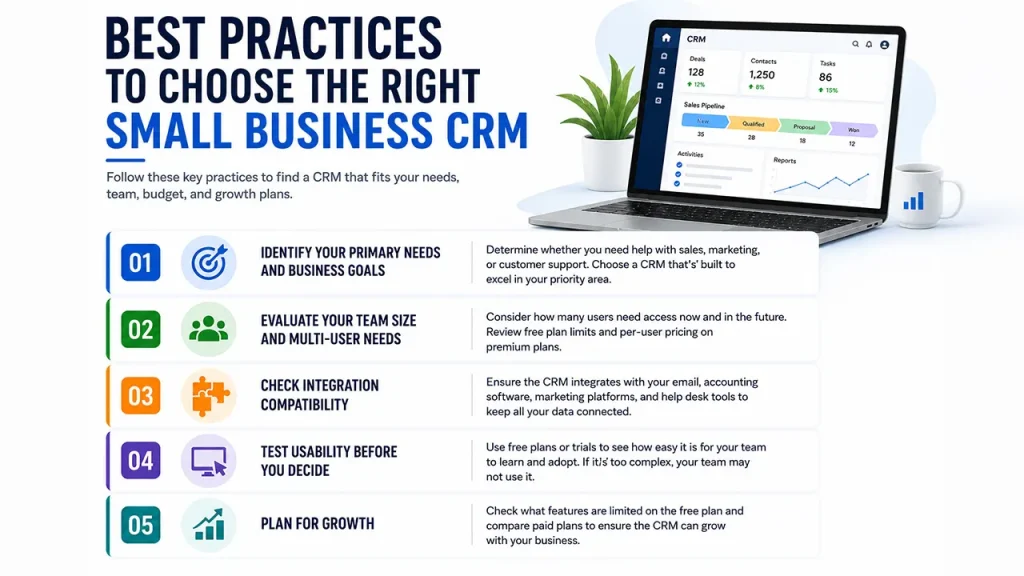
A few key factors are essential to finding out the best CRM tools for small businesses, including understanding your specific process, team size, budget, and growth strategies. This strategic framework helps you make the right decision for your business.
1. Identify Your Primary Needs and Business Goals
Ask yourself a few questions: Are you managing a sales pipeline, nurturing marketing prospects, or handling customer support? Different CRM is built to excel in different areas. For a sales-focused team, Pipedrive stands out as the right fit for you, while a marketing team may find HubSpot more effective.
2. Evaluate your Team Size and Multi-User Needs
Analyzing your team and how many people need access will help you choose the right CRM. HubSpot's free plan allows unlimited users, making it one of the best free CRM tools for small businesses that want to scale. Zoho CRM also offers a free plan, but it limits access to just three users. For teams seeking quick growth, make sure to check per-user pricing on premium plans before committing.
3. Check Integration Compatibility
If your CRM can’t connect to your existing platform, you wind up with data trapped in separate silos. So, don’t skip this step: Make sure the CRM syncs with your email, accounting software, marketing platform, and your help desk setup. Better to detect dealbreakers now than after you’ve signed up.
4. Test Usability Before You Decide
A lot of small businesses avoid using CRMs because they think they’ll be too complicated. Free plans and trials exist for a reason; use them. See how fast your team can actually learn and start using the system. If people avoid it or can’t figure it out, that CRM’s useless, no matter how effectively they deliver value.
5. Plan for Growth
Free CRM tools for small businesses almost always limit things like automation, reporting, and the number of integrations you get. Before you commit, look over the paid options and check what happens when you need more features.
Final Verdict
Choosing the correct CRM tools for small businesses doesn’t always require a large upfront expense. In 2026, many free platforms, including ZohoCRM,HubSpot, Pipedrive, Bigin, and Freshsales provide robust entry points for businesses at every stage.
The goal is to find a platform that aligns with your team’s strength and business processes, not the other way around. Always begin with considering a free plan, verify whether it fits your sales and customer management workflow, and upgrade only when your needs justify the cost. The correct small business CRM automates your business processes, improve user experience, and strengthen commitment while lowering the complexities.
These CRM systems are the reliable solutions, worth considering for businesses of all sizes, whether you are exploring them for the first time, or upgrading from a platform that no longer meets your needs.

.png)
.png)