





.png)
.png)
Every email you send is a small chance to look professional, and a missing or sloppy signature quietly wastes that chance every single time. Benefits of adding email signatures go far beyond just looking polished, though; a well-built signature can drive traffic, build trust, and reinforce your brand with zero extra effort once it’s set up.
This is particularly relevant to guest posting and outreach teams because there is usually no greater understanding of the importance of this point. Every single day, you send tens or even hundreds of cold emails, and with every single one of those, you make an impression. Having your name, position, and a functioning website will prove that you’re a serious company.
In this blog, we’ll get into exactly what email signatures do for you, what a good one actually includes, and how to set one up if you’re sending outreach through GPC.
What Is an Email Signature and Why It Matters?
An email signature is that small block of text sitting at the bottom of every email you send: your name, role, company, and usually a way to reach you or check out your site. As simple as they may sound, email signatures do much more than most people are willing to admit.
Put yourself in the place of those receiving your emails for a second. You receive an outreach email with no signature. Then, you get an email with all of the information you need in it, including your name and message. Now which one looks more legitimate to you? That intuitive feeling you have is the reason why signatures are useful; they serve as cheap credibility boosters.
This is especially important for outreach-oriented jobs such as guest posting, email outreach, or link building when you’re sending dozens of emails a day.
Benefits of Adding Email Signatures

The Use of a signature is often thought of as an insignificant little detail, but the reward is far from negligible:
1. Build Instant Credibility
When an email has a full signature, it implies that it was written by a real person who works for a real company. This may be a small thing, yet many people consider this feature to be the main difference between regular emails and spam.
2. Reinforces Your Brand
All the emails are a great chance to create brand identity. Whenever someone sees the consistent colour scheme, the logo, and proper formatting, it means that by the time he or she meets you for the third or fourth time, your name will already be familiar to him or her.
3. Drives Traffic Without Extra Effort
The hyperlink that takes the recipient to the website or portfolio allows you to market yourself even more effectively with no need to put extra effort into it; all that is required is sending an email.
4. Makes You Easy to Reach
A phone number, calendar link, or social profile means the person reading your email doesn’t have to dig around to follow up. Removing that friction, even slightly, makes it more likely they actually will.
5. Saves Time on Repetitive Typing
The minute it is ready to use, you don’t have to type in your name, designation, and company every single time at the end of an email. It may seem like a trivial thing to do, but it makes a big difference when you consider sending tens of emails every week.
6. Improves Response Rates
When it comes to cold outreach, a professional-looking signature can make all the difference in whether people open the email or delete it right away, considering it spam.
None of these benefits requires a lot of effort; the setup is done once and for all, and the rewards are gained with each subsequent email you write.
What a Good Email Signature Should Include
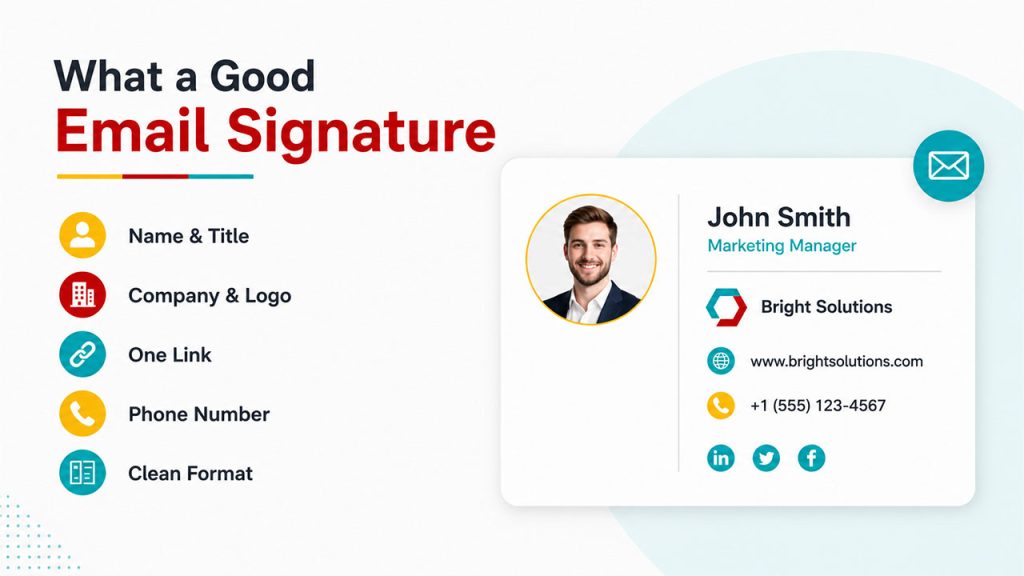
Not every signature needs to be fancy, but a few core pieces make the difference between something that builds trust and something that gets ignored:
Full name and job title: The basics, but they’re what makes the email feel like it’s coming from an actual person.
Company name and logo: Even a small logo adds a layer of legitimacy, especially for outreach where the recipient has never heard of you before.
One clickable link: Your website, portfolio, or LinkedIn. Just one, though; too many links start to look cluttered and spammy.
Your contact phone number: If you want to provide your readers with a quick and easy way to contact you via phone.
A good format: There’s no need for fancy fonts and colours. An email signature must look clean and neat.
It’s important to give as much information as necessary and not overload the reader with unnecessary details. An overloaded signature can do more harm than having no signature at all.
How to Add Email Signatures in GPC
Setting up a signature inside GPC only takes a couple of clicks once you know where to look:
Step 1: Head to your GPC dashboard: This is your starting point for any settings changes.
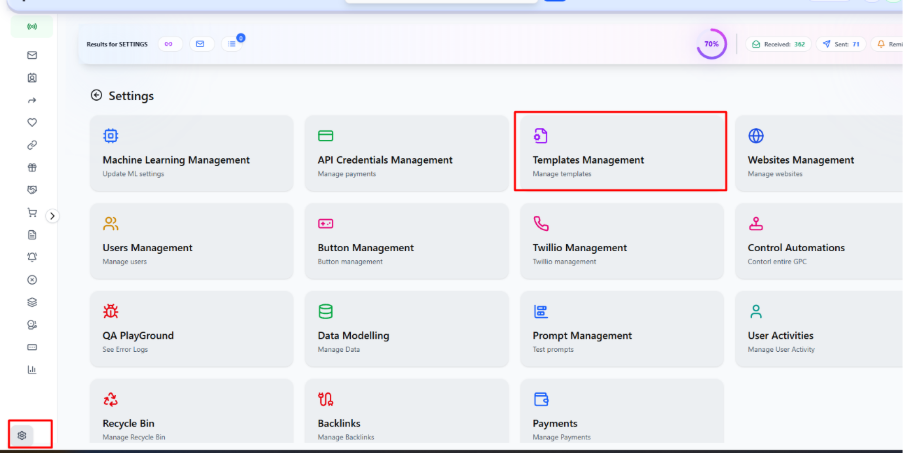
Step 2: Open Settings, then Template Manager: From the dashboard >> click the settings icon in the bottom corner, then select Template Management. Once you’re inside Template Manager, click the + icon in the top right to create a new template.
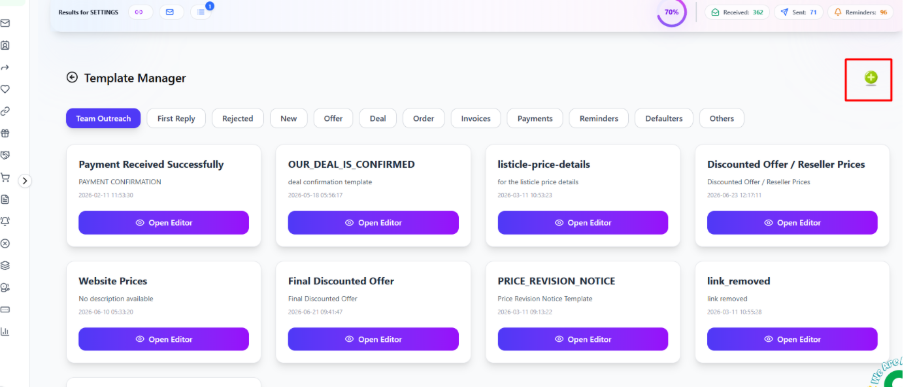
Step 3: Fill in the details: Enter a template name, select the user it applies to, choose “Others” under stage, and paste in your signature’s source code.
Once saved, your signature is stored as a reusable template inside GPC, ready to attach to your outreach without needing to rebuild it every time.
Common Mistakes to Avoid
A few missteps can undo all the trust a good signature is supposed to build:
Too many links: Website, LinkedIn, Twitter, Instagram, calendar link, all crammed in one signature just looks cluttered and unfocused.
Oversized images or logos: A huge logo can break formatting entirely, especially on mobile, and makes emails feel heavier than they need to be.
Outdated information: An old job title or a dead link quietly chips away at credibility the moment someone notices.
Inconsistent formatting across the team: If everyone’s signature looks different, it undercuts the whole point of building a consistent brand impression.
Skipping mobile testing: A signature that looks fine on desktop can break completely on mobile, so it’s worth checking both before rolling it out.
Small mistakes like these are easy to fix, but they’re just as easy to overlook if you set your signature once and never revisit it.
Also Read:
Top 16 Email Signature Examples
How to Add Signature in Outlook
Conclusion
At the end of the day, an email signature is one of the smallest changes that delivers an outsized return. The email signature benefits we’ve covered here credibility, brand recognition, easier follow-ups, and better response rates all come from a single setup that takes minutes to get right.
For those of you doing outreach on a massive scale, whether that’s manual vs automated outreach, guest posting or backlinking, not having an email signature simply leaves you with lost trust and traffic without rhyme or reason.
If you haven’t done that yet, or haven’t updated yours in a long time, then spend the next five minutes fixing that problem.



.png)
.png)