





.png)
.png)
Everyone from professionals to normal users is facing the challenge of digital clutter. From overflowing download folders to duplicate photos scattered across devices, unorganized files waste time and create unnecessary stress. Figuring out how to declutter digital files is the new must-have skill for staying productive, getting better organized, and handling your digital work seamlessly from different devices and platforms.
This article is designed to give you actionable tips that will help you tidy your digital life, whether it's a mass of documents on your laptop or a mess of cloud-based storage. At the end, you will have a solid structure to organize files, to delete unwanted files, and to keep your system clean for the long haul.
What Is Digital Decluttering?
Digital decluttering is the time-consuming task of reviewing, organizing, archiving and deleting files on devices and in cloud platforms. It includes anything from documents and spreadsheets to photos, videos, emails, and app data.
Digital decluttering is very different from physical clutter, in that it can be hidden in multiple folders, cloud storage accounts that are forgotten, and inbox clutter. It is easy for many people not to be aware of the issue until they are forced to use their mobile device without any storage space or when they have lost an important file in a cluttered file system.
Many people don't know the extent of the impact of poor file management. According to Finances Online, 18 minutes of daily worker time is lost searching for documents and more than 21% of daily productivity loss is attributed to file-related issues in 2021. The study also revealed that 86% of workers have trouble locating office files and 83% have had to recreate documents due to being unable to find the originals. In essence, digital decluttering is about.
- Free up valuable storage space on devices and cloud accounts.
- Provide faster and better computers and smartphones.
- Save time in locating key documents.
- Reduce the chances of data breaches by removing sensitive files that are no longer required.
Knowing what digital decluttering is, is the first step. The sections below walk through exactly how to declutter digital files in a structured way.
How to Declutter Digital Files: A Step-by-Step Guide
Decluttering is best done in stages, and in manageable portions. Attempting to do it all at once can be frustrating. The sequence of the following steps is logical for professionals and personal users.
1. Choose a Consistent Folder Structure
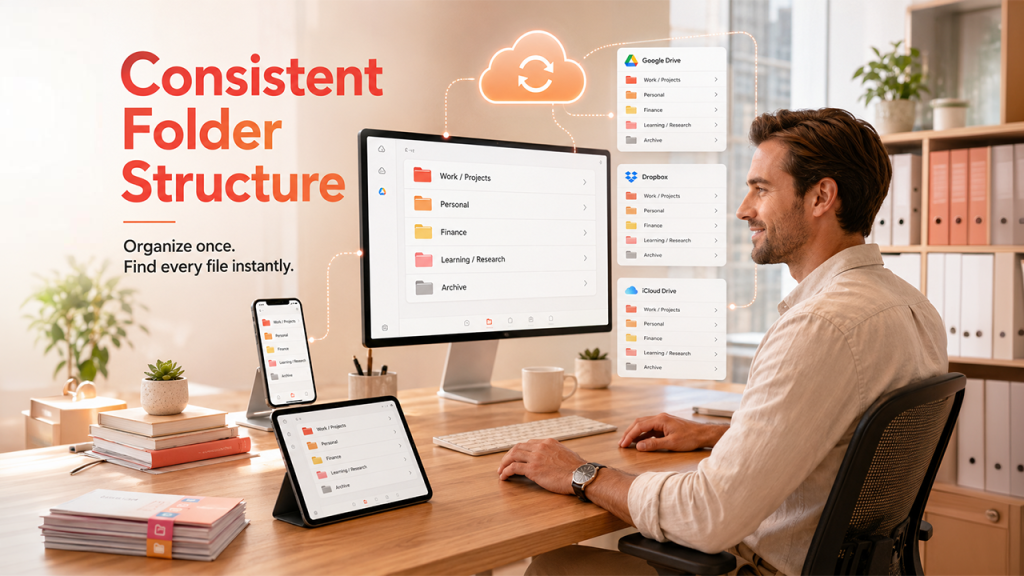
Determine the folder structure you will employ on all platforms before moving or deleting anything. Many users end up storing their notes in different applications, such as a local note-taking app and a cloud-based storage solution. This inconsistency can cause problems finding files when you need them. A good way to do this is to make general top-level folders that can be applied all the time. Examples include:
- Work or Projects
- Personal
- Finance
- Learning or Research
- Archive
Keep the same folder names on your desktop, Google drive, Dropbox or anywhere other. The system is sustainable due to consistency. If your folder structure is the same on both platforms, you start getting the feel of where the files can be found, and it becomes second nature.
2. Clean Local and Cloud Storage
Use the local storage first. Unlock your desktop, downloads folder and documents folder. (The downloads folder should be located in the desktop and the documents in your desktop folder). Use the 'Sort by Modified date' feature to find files you haven't used for months. Copy and transfer important files to the new folder structure and remove duplicates, old drafts and unneeded files.
Then repeat the process on your cloud storage. When users share files with others on a platform such as Google Drive, OneDrive, or Dropbox, the services tend to collect previous file uploads and shared files. Take a look at each folder, delete any unneeded folders, and structure the folders in the same way you will do locally. This is an important step in the process of knowing how to declutter digital files.
3. Organize Photos and Media
Biggest storage users are photos and videos. One effective tip is to only store the last few photos (within the last month or two) on your phone and transfer the older ones to an external hard drive or a cloud-based photo album. While organizing media files, keep in mind the following.
- Remove blurry, duplicate and irrelevant pictures first.
- Organise albums or folders by events, dates or categories.
- Adopt a naming convention that contains the date so that the file can easily be sorted.
- Store finalized collections at an alternate site for protection.
Many smartphones now offer built-in tools that identify duplicate or low-quality images. Take advantage of these utilities before manually sorting through thousands of files. Automating this first pass saves considerable time.
4. Manage Inbox Overload

One of the most prevalent types of digital clutter is an overflowing Inbox. First of all, unsubscribe from newsletters and promotional emails you don't read. Most email clients have filters and rules to help you automatically sort incoming emails into specific folders.
Remove a year of messages which aren't relevant. If the email needs to be acted on, place it in a task manager instead of as a to-do task in the inbox. The idea is to lower the amount that flows in, so that you don't need to work as hard to get it out of the way. However, GuestPostCRM Smart Email Filtration automatically sorts out any important emails, filters spam and promotions, and keeps your inbox clutter free so you can manage your emails faster and focus on the important ones.
5. Use Tags and Naming Conventions
Folders don't always get the job done. The tags and consistent naming further enhance organization. Good file name has date, short description and version number if applicable. For instance: 2026-05-Report-Q1-Sales-v2.xlsx is much more useful than Final_FINAL_doc.xlsx.
You can use tags to connect related files among various folders. Tagging is a feature used in many cloud storage tools and note-taking applications, and it's something that you should consider incorporating in your digital decluttering efforts when trying to organize for long-term use.
How to Maintain a Clutter-Free Digital Environment
Decluttering doesn't happen just once. If not maintained regularly, files quickly build up again after weeks. There are some habits that you can engage to keep your digital workspace clean and to stop the clutter cycle from repeating itself.
1. Schedule Regular Reviews
Schedule a reminder to review files on a regular basis, e.g., monthly or quarterly. For each session, remove items that are no longer current, save project files in the archive folder and ensure that new files are placed in the appropriate folders. Think of this review as part of your software maintenance or back-up schedule.
2. Adopt a One-In, One-Out Rule
If you create a new file, don't forget to remove/arch a previous version. This helps to avoid any accumulation and keeps folders slim. It's a little thing that adds up.
3. Limit Active Files
Only store files you are currently working on in convenient places, such as on the desktop or in recent files. All other items should be classified or filed away. This way, you have fewer objects cluttering your screen and can get the files back quicker.
4. Audit Your Apps and Subscriptions
Remove apps you don't use much and cancel services that aren't providing any value. Less apps, less notifications, less places to track files.
Conclusion
Knowing how to declutter digital files gives you more than a tidy hard drive. It provides you improved functionality of devices, improved productivity and considerably less time to search for lost documents. It begins with a standardized folder structure, continues with the systematic clearing of local and cloud drives and relies on regular maintenance to remain effective. Select one device or one folder today, follow the process listed above and start from there. Creating a neat digital filing system isn't a task that can be completed in an afternoon, but it's an achievable goal if you have a strategy and work at it regularly. This time invested today will pay off daily when you are sitting at your desk and discover just what you're looking for, where you expected to find it.



.png)
.png)