



Guest posting is a valuable way to build backlinks, reach new audiences, and improve your website's online visibility. However, managing multiple guest posts across different websites can quickly become complicated. You may have articles awaiting publication, links that need correction, payments to confirm, and publishers who have not responded to your emails.
Without a structured process, it is easy to lose track of important details or miss opportunities to improve your link-building results. This is where learning how to track guest post placements becomes essential.
A reliable tracking process helps you monitor published articles, verify backlinks, manage publisher relationships, and measure the overall performance of your outreach campaigns. Whether you manage ten guest posts or hundreds of placements, the right system makes your work more organized and efficient.
1. Create a Centralized Guest Post Tracking Spreadsheet
The first step is to maintain a single spreadsheet containing information about every guest post. Instead of switching between emails, documents, and SEO tools, you can access all your campaign details from one place.
A centralized spreadsheet makes guest post tracking easier because it provides a clear overview of your outreach activities and publication progress.
Include the following columns in your spreadsheet:
- Website Name: The publisher's website.
- Website URL: The homepage or relevant publication page.
- Target Page URL: The page on your website receiving the backlink.
- Anchor Text: The exact text used for your backlink.
- Article Title: The title of your submitted guest post.
- Outreach Date: The date you contacted the publisher.
- Submission Date: When you submitted the article.
- Publication Date: When the article went live.
- Published URL: The final URL of the guest post.
- Placement Status: Outreach, approved, submitted, published, or rejected.
- Backlink Status: Live, missing, changed, or removed.
- Follow-Up Date: When you should contact the publisher again.
- Cost: The amount spent on the placement, if applicable.
This structure allows you to identify pending work, monitor publishing schedules, and keep important information accessible.
For example, if you manage guest posts across 30 websites, a spreadsheet can help you identify which publishers have published your articles and which still require follow-up.
2. Establish Clear Placement Statuses
One of the most common mistakes in guest posting is treating an approved article as a completed placement. Approval does not guarantee publication, and publication does not guarantee that the backlink is correct.
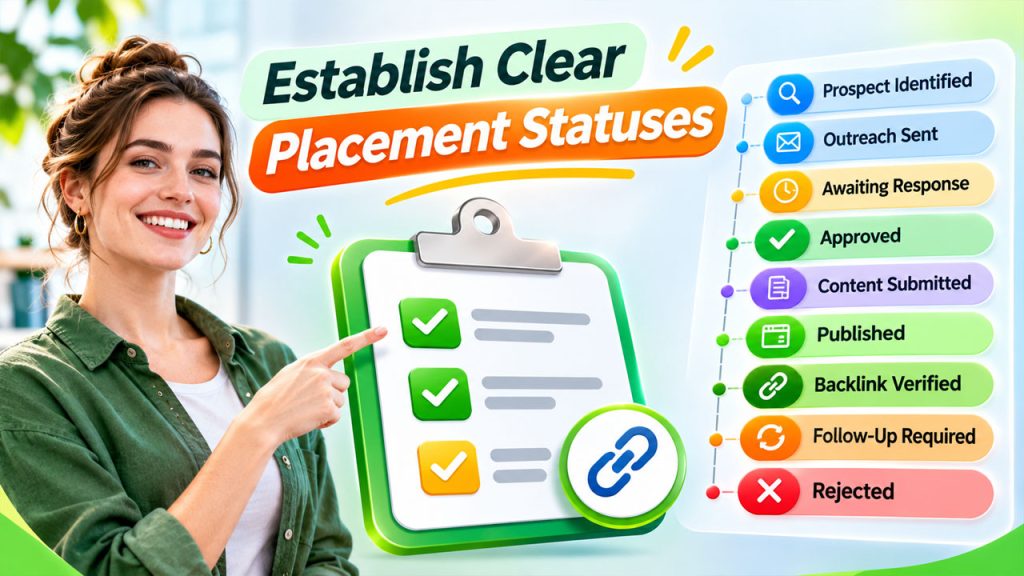
To avoid confusion, create a standardized status system for every website.
Consider using these statuses:
- Prospect Identified: The website has been shortlisted.
- Outreach Sent: An initial email has been sent.
- Awaiting Response: The publisher has not replied.
- Approved: The publisher has accepted the proposal.
- Content Submitted: The article has been delivered.
- Published: The article is publicly accessible.
- Backlink Verified: The required backlink has been checked.
- Follow-Up Required: An issue needs attention.
- Rejected: The publisher declined the proposal.
Clear statuses improve placement management by showing exactly where each opportunity stands.
You can also apply conditional formatting in Google Sheets or Microsoft Excel. For example, green can represent verified placements, yellow can indicate pending work, and red can highlight missing backlinks.
This simple visual system makes it easier to prioritize daily tasks without reviewing every row individually.
3. Verify Every Published Guest Post
Once a publisher confirms that your article is live, do not immediately mark the task as complete. Open the published page and check whether everything matches your original agreement.
Start by confirming that the article loads correctly and is publicly accessible. Next, locate your backlink and review its destination, anchor text, and placement within the content.
Effective backlink placement tracking involves checking several important details:
Correct destination URL: Confirm that the link points to the intended page on your website rather than your homepage or an unrelated page.
Accurate anchor text: Check whether the publisher has used the agreed anchor text or substituted a different phrase.
Link accessibility: Click the backlink to ensure it opens the correct destination without returning an error or redirecting unexpectedly.
Link attributes: Inspect whether the backlink uses rel="nofollow", rel="sponsored", or another relevant attribute. Record what you find rather than assuming every link is a standard editorial link.
Article accessibility: Confirm that the article is publicly accessible and does not require a login to view.
Content accuracy: Make sure the article has not been substantially altered in a way that changes its meaning or removes important information.
If something is incorrect, contact the publisher politely and request the necessary correction.
Remember that a live backlink is not automatically a valuable backlink. Relevance, editorial quality, and the credibility of the publishing website also matter.
4. Use SEO Tools to Monitor Backlink Changes
Manually checking every guest post is manageable for a small campaign, but it becomes time-consuming when your placement portfolio grows.
SEO tools can help you monitor your backlink profile and identify changes that require investigation.
Tools such as Ahrefs, Semrush, and Google Search Console can support different parts of this process.
- Ahrefs: Review referring domains, backlink information, and changes detected in your backlink profile.
- Semrush: Analyze backlinks, referring domains, and potential changes in your link profile.
- Google Search Console: Review links Google reports for your website, keeping in mind that its links report is not a complete real-time backlink monitoring system.
These tools complement your spreadsheet rather than replacing it.
For example, your spreadsheet might show that a guest post was published three months ago. A backlink analysis tool may later indicate that the referring link has disappeared or changed.
You can investigate the original page, confirm the current status, and contact the publisher if necessary.
Although SEO tools can help identify changes, their data may be delayed or incomplete. Always verify important findings directly on the publishing website.
5. Schedule Regular Backlink Audits
A guest post that contains a working backlink today may not retain that link permanently. Publishers can update articles, remove external links, change URLs, or delete older content.
That is why regular audits should be part of your tracking routine.
A practical schedule could include:
- Immediately after publication: Verify the article and backlink.
- After 30 days: Check whether the article remains accessible and the backlink is intact.
- Every three months: Review previously published placements for missing links, redirects, and significant content changes.
- During monthly SEO reviews: Compare backlink changes with your overall link-building activity.
This routine makes backlink placement tracking more reliable because it covers both newly published articles and older placements.
If you discover a missing backlink, first determine whether the article has been updated, moved, or removed. Then contact the publisher with the original article URL and explain the issue clearly.
Avoid assuming that every missing backlink has been deliberately removed. Technical changes, website migrations, and editorial updates can also cause problems.
6. Track Placement Quality, Not Just Quantity
Publishing 100 guest posts does not necessarily produce better SEO results than publishing 30 relevant, high-quality articles.
The value of a placement depends on several factors, including topical relevance, editorial standards, audience engagement, and the quality of the linking page.
Your tracking sheet should therefore include a few quality indicators.
For example, record:
- Website and article relevance to your niche.
- Estimated organic visibility and referring-domain information.
- Whether the website publishes original, useful content.
- Whether the article appears accessible to its intended audience.
- The destination page receiving the backlink.
- The cost of the placement, where applicable.
- Referral traffic or relevant engagement, when measurable.
Use these indicators to compare placements and understand which opportunities deserve more attention.
Do not rely exclusively on domain authority or domain rating scores. These are third-party metrics, not direct Google ranking factors, and they cannot independently establish whether a website is trustworthy or a backlink will improve rankings.
A relevant editorial mention on a genuine industry website may be more useful than a link from a website that publishes unrelated articles solely to sell backlinks.
7. Automate Reminders and Reporting
As your outreach campaign expands, repetitive administrative tasks can consume a significant amount of time.
Automation can help you remember follow-ups, flag overdue submissions, and prepare regular performance reports.
For example, you can use spreadsheet formulas to highlight placements that have remained in the submitted stage for more than two weeks. Calendar reminders can help you follow up with publishers, while automated workflows can send notifications when a placement changes status.
You can also maintain a weekly report containing:
- New outreach emails sent.
- Responses received from publishers.
- Articles approved and submitted.
- Guest posts published during the week.
- Backlinks successfully verified.
- Missing or changed backlinks.
- Total placement expenditure.
- Follow-ups requiring action.
These reports make placement management more organized and help you identify delays before they affect campaign productivity.
However, automation should support human review rather than replace it. A spreadsheet formula cannot determine whether a website is genuinely relevant or whether an article provides meaningful value to readers.
8. Review Results and Improve Your Strategy
The final step is to use your tracking data to make better decisions.
Review your placements monthly and identify patterns in publisher responsiveness, publication timelines, backlink retention, and referral traffic.
If certain websites consistently publish relevant articles and attract the right audience, consider building long-term editorial relationships with them.
If other publishers repeatedly delay publication, change agreed links without permission, or provide little editorial value, reconsider whether future collaboration is worthwhile.
You should also connect your guest posting activity with broader SEO performance. Monitor relevant landing pages in Google Search Console and analytics tools, but avoid attributing ranking improvements to a single backlink without sufficient evidence.
A structured system helps you track guest post placements with greater consistency and understand how your outreach efforts contribute to your overall marketing goals.
Conclusion
Managing guest posts across multiple websites does not have to be complicated. A centralized spreadsheet, clear placement statuses, routine backlink verification, and regular reporting can give you better control over your entire campaign.
The key is to look beyond the number of published articles. Track whether each placement is accessible, relevant, correctly linked, and worth maintaining.
When you combine organized records with reliable SEO tools and consistent follow-ups, you can spend less time searching for information and more time building valuable publisher relationships.
Ultimately, an effective process to track guest post placements helps you make informed decisions, reduce missed follow-ups, and manage your outreach activities with greater confidence.