




.png)
.png)
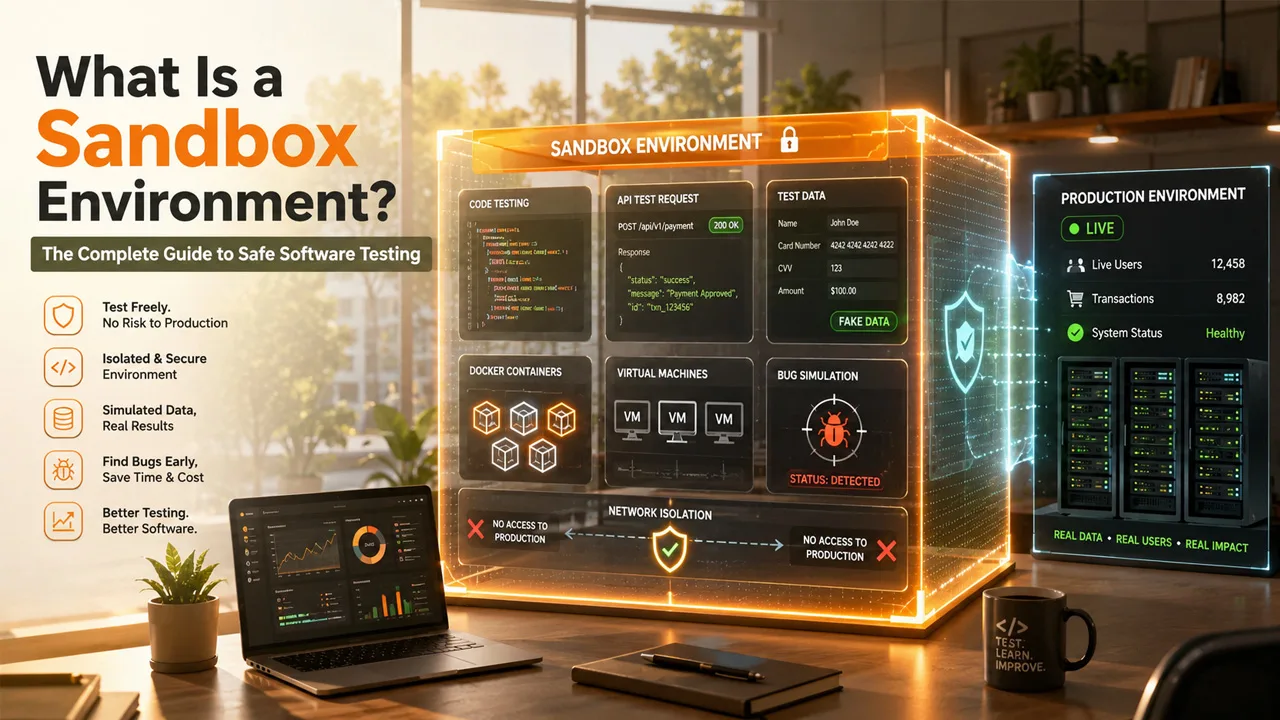
Generally, software failures happen because someone skipped proper testing. A sandbox environment is one of the smartest tools in modern software development, and yet a lot of teams treat it just as optional. It is not. You can consider it like an isolated practice field, a space where developers, testers, and security teams can run experiments, break things on purpose, and fix bugs without touching the real system. Nothing that happens inside a sandbox spills over into the live product. That separation is exactly what we want to emphasize.
What "Isolated Testing Space" Actually Means?
The word "isolated" gets thrown around a lot, but here is what it actually looks like in practice. A sandbox testing environment sits completely apart from the actual production system. It uses the same setup, configurations, and sometimes even a copy of the data, but nothing connects to real users or real transactions. Developers can crash the whole thing and start fresh without anyone noticing. This is different from just running tests on a local computer.
A proper sandbox mirrors the actual environment closely enough that what you test there behaves the same way once it goes live. That level of accuracy is what makes it genuinely useful.
The Mechanics Behind the Isolation
Keeping It Separate from Live Systems
The first thing a sandbox environment does is cut itself off from production. Network access gets restricted, permissions are locked down, and the whole setup runs inside a virtual layer. Developers can push new code, change configurations, and simulate user behavior, all without touching the actual system. If something breaks, it stays contained.
Most sandboxes run on virtual machines or containers like Docker. These tools create a mini-computer inside your real computer, so the isolated test environment has its own operating system, its own memory, and its own storage. A mistake inside that virtual space stays there, period.
Simulated Data, Real Results
Real customer data never goes into a sandbox. Instead, teams use fake but realistic data, made-up names, dummy payment details, and sample API credentials. This protects user privacy and keeps the testing compliant with data regulations. The goal is to make the simulation realistic enough that the results actually mean something when you take the feature live.
Payment systems are a good example here. A team testing a new checkout flow will use fake card numbers provided specifically for sandbox testing environment purposes. The transaction goes through all the same steps, just without any real money moving.
Types You Will Come Across
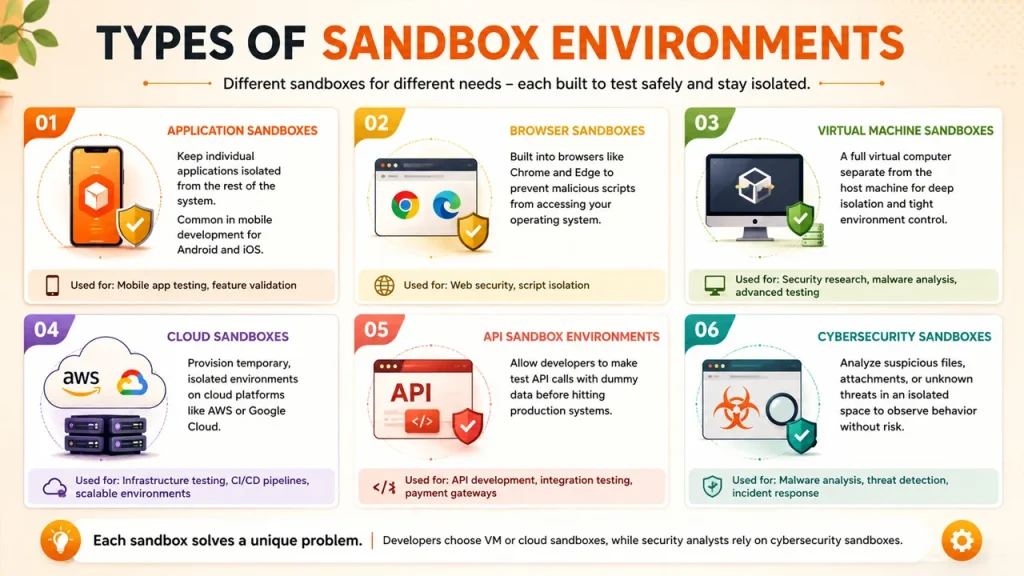
Not every sandbox works the same way, and honestly, that's a good thing. The one you reach for depends on what you're testing and how your team operates. Here's a quick breakdown of the most common types.
- Application sandboxes keep individual apps walled off from the rest of the system. If you've done any mobile development for Android or iOS, you've already been working inside one without thinking much about it.
- Browser sandboxes are baked directly into browsers like Chrome and Edge. Their whole job is making sure a malicious script on some sketchy webpage can't crawl its way into your operating system.
- Virtual machine sandboxes go deeper. You get a full virtual computer, completely separate from your host machine, which makes them a favorite for security research or any testing that needs tight environmental control.
- Cloud sandboxes take a different angle. Instead of spinning up local environments, you provision temporary ones on platforms like AWS or Google Cloud. Teams running infrastructure tests or CI/CD pipelines tend to live in these.
- API sandbox environments let developers fire off test calls using dummy data before anything goes near production. Payment platforms and fintech companies lean on these heavily. Nobody wants a half-baked integration touching real transactions.
- Cybersecurity sandboxes handle the sketchy stuff. Got a suspicious attachment or an unknown file? You run it here first, in an isolated space, and watch what it does before letting it anywhere near your main network.
Each sandbox type exists because each problem is unique. A development team will typically gravitate toward VM or cloud options. When it comes to a security analyst, they're going straight for the cybersecurity sandbox.
Two Environments, Completely Different Rules
| Feature | Sandbox Environment | Production Environment |
| Purpose | Testing and development | Live user access |
| Risk Level | Low | High |
| Data Used | Fake or simulated | Real customer data |
| User Access | Developers and testers | End users |
| Stability | Can break freely | Must stay stable at all times |
The production environment is the real product. Real users, real data, real consequences. The sandbox testing environment is the practice run. Breaking things there is expected. Breaking things in production is a problem that costs time, money, and trust.
Sandbox vs Staging: People Mix These Up
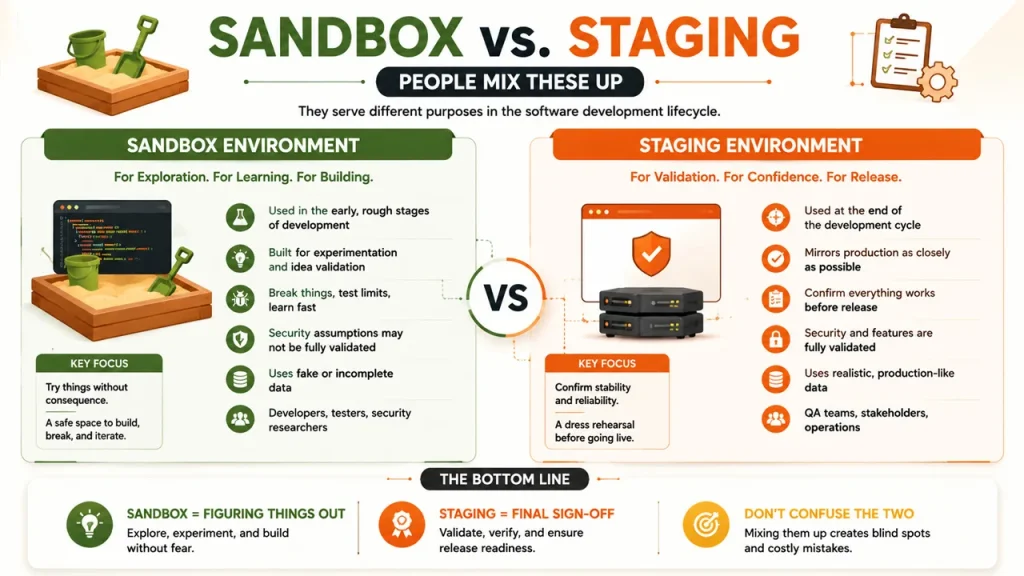
Staging and sandbox environments are not interchangeable, even though teams sometimes treat them that way.
A staging environment earns its place right at the end of the cycle. It mirrors production as closely as possible and exists for one reason: to confirm everything works before a release goes out. There's not much room for experimentation there.
A sandbox operates in a completely different headspace. It belongs to the earlier, rougher part of building software, when features are half-formed, security assumptions haven't been validated yet, and the whole point is to try things without any consequence.
One is for final sign-off. The other is for figuring things out. Conflating the two doesn't save time. It just creates gaps where mistakes quietly survive long enough to become someone else's problem.
Industries and Teams That Rely on Sandbox Environment
Payment and Fintech Systems
Sandbox is available on every major payment gateway. On Stripe, PayPal, and others, you get access to test API keys and card numbers that allow you to develop your checkout process and conduct error handling. A bug detected using the sandbox costs nothing, while one detected in the production environment will likely cost your company's reputation and money.
Cybersecurity and Malware Analysis
Cybersecurity teams use sandboxes differently. When a suspicious email lands in a company's inbox, instead of opening the attachment on the main network, analysts drop it into a cybersecurity sandbox. The file runs freely inside the isolated environment. If it tries to do something harmful, the sandbox catches it without letting the damage spread. This is one of the most practical uses of the technology, and it protects organizations from serious security incidents regularly. Many Company also use cybersecurity sandbox systems alongside advanced spam detection tools to safely analyze suspicious activities.
API Development and Software Integration
Testing API connections without a sandbox is genuinely risky. One bad call can overwrite data, fire off actions you didn't intend, or quietly break something in a live integration.
An API sandbox gives developers a place to send real requests against a simulated server, inspect what comes back, and sort out any issues well before the integration touches production. It also comes in handy when teams from different companies need to verify how their systems will talk to each other before anything actually goes live.
Getting Sandbox Environment Running Without Overcomplicating It
Standing up a sandbox environment doesn't take a large team or a convoluted process. Here's a straightforward path to follow.
- Begin by defining the purpose. Whether you're validating a new feature, doing security research, or wiring up an API integration, the answer to that question shapes every decision that follows.
- Then pick an infrastructure that suits the job. Cloud setups cover most use cases well. Containers are lighter and spin up faster. Virtual machines give you more granular control over the full operating system when you need it.
- Isolation is where a lot of teams cut corners, and they shouldn't. Lock down network access, tighten permissions, and make sure the sandbox has no path to production systems.
- Load it with realistic test data. Synthetic or anonymized data that mirrors real-world scenarios works well here. The goal is accuracy without exposing actual user information.
Finally, monitor and log everything that happens. Run your tests, capture errors, and document the results clearly enough that the team can actually act on what the sandbox surfaces.
Read More: What Technology Provides Secure Access to Websites
Stop Testing in the Dark
Every team that skips sandbox testing is essentially pushing untested code into the world and hoping nothing breaks. This approach is pretty risky. A proper sandbox environment gives you the space to catch problems on your terms, before real users ever see them.
One thing that needs to be understood is that the cost of setting one up is nothing compared to the cost of a production failure. Software companies, banks, healthcare systems, fintech platforms, and ecommerce businesses all use sandboxes for a reason.
Therefore, start using a sandbox environment properly, and the improvement in software quality becomes obvious quickly.



.png)
.png)