




.png)
.png)
If you’ve ever wondered why a well-written blog post still isn’t ranking, the answer often has nothing to do with the content itself. Technical SEO is usually the missing piece, the behind-the-scenes work that determines whether search engines can even find, understand, and index your pages in the first place.
The analogy would be similar to that of a building: you can have any beautiful interior, yet if the foundation of the building is poor, then nothing matters. Search engines need to crawl your website and properly render and index its pages before your content can even be considered for ranking and used as an answer for AI-driven questions, which become increasingly common today.
In this blog, we’ll break down what technical SEO actually covers, why it matters more than ever, and the practical steps you can take to audit and strengthen your site’s technical foundation.
What Is Technical SEO?
Technical SEO refers to the process of optimizing website architecture for search engines and artificial intelligence systems to crawl, render, and index its content properly. For a broader understanding of how SEO works and where technical SEO fits within the overall discipline, this guide to SEO provides useful context. It focuses more on making sure your website is actually accessible and understandable in the first place.
If someone ever tried to find out what technical SEO is in simple words, then here is how you can think about it. It is the plumbing system in your website that users never come across directly, but if it is broken, all that you build on it is affected, regardless of its efficiency.
This includes things like website speed, mobile optimization, secure connection, good URL structure, and allowing the search engines to access all the pages of your website without running into any dead ends.
Why Technical SEO Matters
Even if you have the best content possible, you will not be able to make any use of it if search engines do not see it. In other words, that is the reason why technical SEO is essential because it ensures that your pages can actually be considered for inclusion in the search engine results.
It has become more important because the way search itself works has changed over time. The idea of SEO has become more than simply ranking well in regular Google results; now there are ChatGPT, Google AI Overviews, and Copilot services that use websites to generate their answers. So, if your website is not crawlable or structured properly, you may miss out on ranking and being cited in the AI-generated responses altogether.
A solid technical foundation makes sure research engines can find your pages, understand how they relate to each other, and index the right versions, which supports both traditional visibility and this newer, AI-driven side of search.
Crawling and Indexing Basics
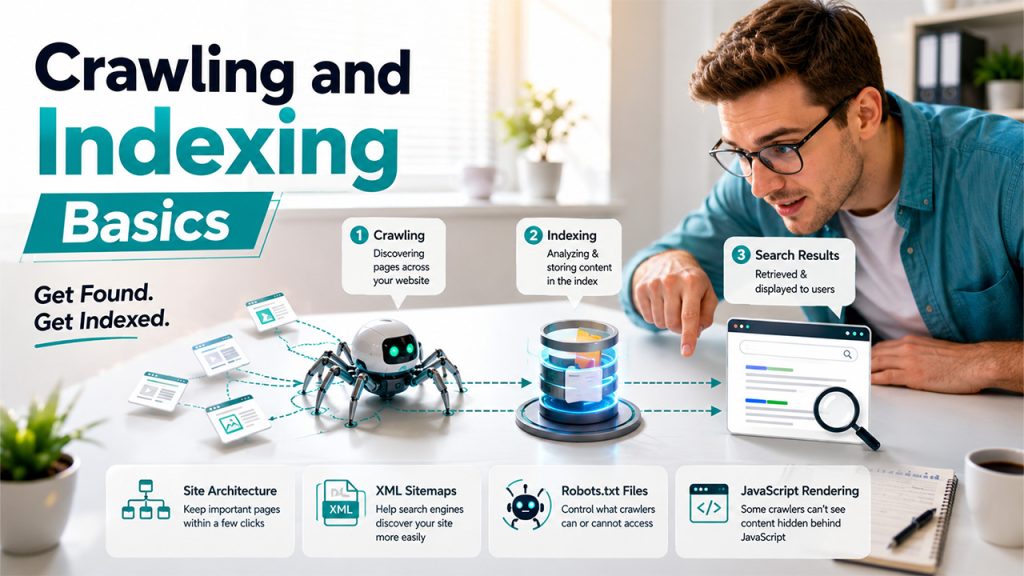
Before any page can rank, it needs to pass through two separate phases, crawling and indexing, and being aware of that distinction can help you understand how SEO technically operates.
The crawling process involves the search engine following links from pages that the search engine is aware of to reach other pages that are not in its index yet. This means that internal links play a crucial role since if a page doesn’t have any inbound links, it is an orphaned page.
Indexing comes after crawling. Once a page is discovered, search engines analyse and store its content in their index, essentially a massive database of webpages. A page has to be indexed before it can ever appear in search results. If you want to understand how crawling, indexing, and ranking fit together, this guide to search engine basics provides a useful overview.
A few things directly affect this process:
- Site architecture: Keeping important pages just a few clicks from your homepage help crawlers find and prioritize your content efficiently.
- XML sitemaps: A file listing your important pages, submitted through Google Search Console, that helps search engines discover your site more easily, especially for larger sites.
- Robots.txt files: It allows you to control which crawlers can access what part of your website. Misconfiguring your robots.txt file might actually prevent important pages from being crawled and indexed.
- JavaScript rendering: Many AI crawlers don’t execute JavaScript the way Google does, so content that only appears after rendering may go completely unseen by certain systems.
Getting these fundamentals right is really what separates a site that gets properly crawled and indexed from one that quietly stays invisible, no matter how good the content on it actually is.
Technical SEO Best Practices
Once crawling and indexing are handled properly, a handful of ongoing best practices keep a site technically healthy over time.
- Use HTTPS: A secure connection isn’t optional anymore. It’s been a ranking signal for years, and both users and AI systems tend to trust secure sources more when deciding what to surface or cite.
- Fix duplicate content: When the same content exists across multiple URLs, it splits ranking signals and leaves search engines unsure which version to actually show, sometimes wasting crawl budget in the process too.
- Improve page speed: Image compression, use of a content delivery network, and minifying code, if possible, can all assist. Page loading speed is indeed a ranking factor on mobile and desktop sites, and slow pages often lose viewers before they even load.
- Ensure mobile friendliness: This is because Google uses the mobile version when indexing a website; anything that is not on the mobile version is considered non-existent, no matter how good the desktop version may be.
- Add structured data: Schema markup helps search engines understand exactly what a page is about, and it can unlock rich snippets, the extra details like star ratings or pricing that make a result stand out in search.
- Fix broken pages: Broken links use up crawling budget and reduce the user experience, particularly when there are other pages that continue to link to them.
- Optimize for Core Web Vitals: Page experience metrics such as load speed, interactivity, and visual stability affect the page experience score, and low scores could undermine an otherwise solid site.
None of these need to be tackled all at once. Working through them methodically, starting with crawlability and speed, tends to deliver the most noticeable improvement first. For agencies managing multiple client sites at once, having a clear SEO framework in place makes it much easier to prioritize these fixes consistently across accounts instead of tackling each one from scratch.
How to Perform a Technical SEO Audit
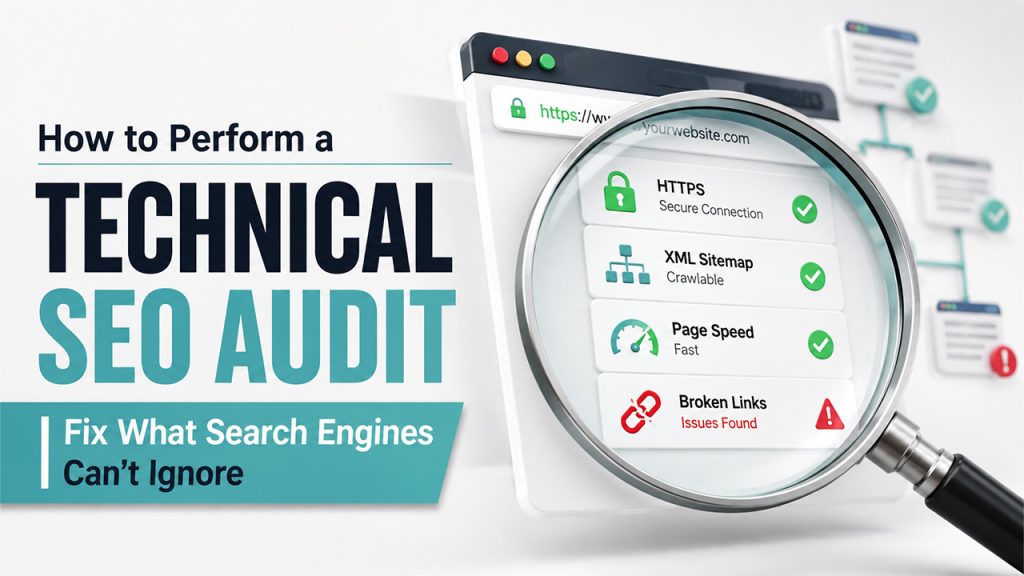
A technical SEO audit is really just a structured way of checking whether everything covered so far is actually working the way it should on your live site.
Start with Crawlability. Make sure that your robots.txt file does not block access to any of your important pages, and that you have uploaded an updated XML sitemap to Google Search Console. Once this step is complete, it is time to find out about any possible orphan pages on your website.
Next, check indexing status. Performing a simple “site: yourdomain.com” search in Google will reveal the approximate number of your pages that are indexed. If this number is much lower than your total page count, there must be something wrong with your crawling or indexing process.
From there, work through the technical basics: You will need to check that you have HTTPS enabled on your website, use a page speed tester for your key pages, and check that you have mobile-friendly pages using something such as Google’s PageSpeed Insights.
It is not just a one-time job. Performing an audit every quarter, or whenever there have been any significant changes to the website, will help identify any potential problems early on.
Tools for Technical SEO
A handful of tools are needed to perform technical SEO and troubleshoot issues:
- Google Search Console: This is free software from Google that displays indexing information, crawl errors, mobile usability problems, and Core Web Vitals performance.
- Google PageSpeed Insights: Provides an in-depth analysis of the speed and mobile friendliness of pages, along with actionable suggestions for optimization.
- Site audit crawlers: These are the crawlers that can audit your entire website at once and find things such as broken links, duplicates, and missing structured data.
- Schema markup generators: Tools for implementing structured data without writing the code by hand.
As search itself evolves, with AI-generated answers now pulling from multiple platforms, it’s also worth understanding how something like GEO vs SEO vs AEO fits into the picture, since each approach targets a slightly different way content gets discovered and surfaced today.
Conclusion
However, ultimately, technical SEO isn’t the exciting part of digital marketing, but the one on which everything else relies. If a website lacks technical optimization, even the best content and the strongest backlink profile won’t get the visibility they deserve.
Fortunately, most of these steps aren’t difficult to achieve once sorted out by their priority, starting from crawling and indexing and moving towards performance, mobile usability, and schema markup. None of it requires guesswork either; tools like Google Search Console make it straightforward to see exactly where a site stands.
For agencies handling this work across multiple client accounts, staying organised matters just as much as the technical fixes themselves, which is where having reliable SEO agency billing software in place helps keep operations running smoothly alongside the actual optimization work.



.png)
.png)