




.png)
.png)
Most productivity tools promise to save you time. In reality, they just give you a fancier place to store information. You still have to write, organize, and find everything yourself.
Notion AI changes that. Among the rapidly growing category of AI tools, Notion AI stands out by thinking alongside you rather than replacing you. It drafts your content, summarizes pages, answers questions from your own data, and even executes multi-step tasks on your behalf. It is not just a feature upgrade; it’s a fundamentally different way of working.
This guide covers everything you need to know about Notion AI: what it is, how it works, who it is built for, and whether it is worth the investment.
What Is Notion AI?
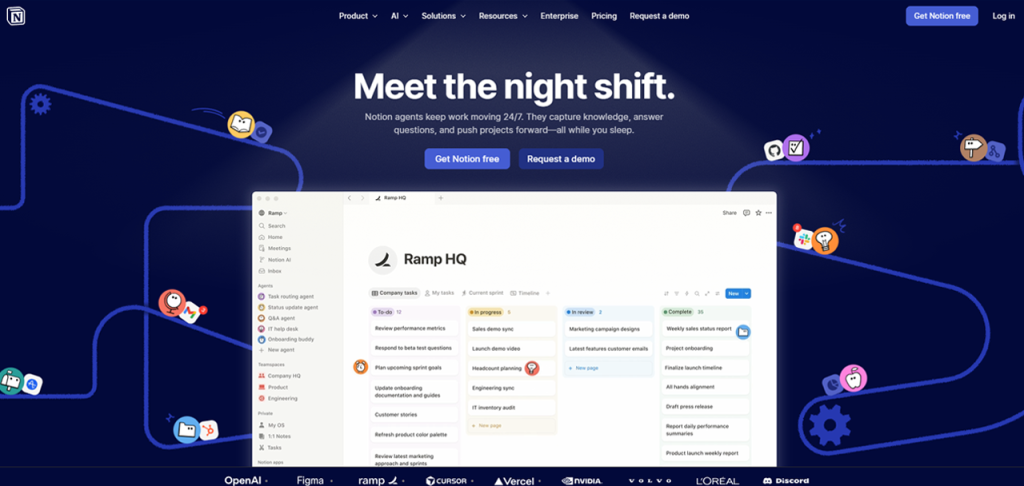
In 2026, Notion AI is seen as a flexible, block-based workspace where users can create notes, databases, wikis, and project boards to keep everything in one place. By 2026, it serves over 100 million users globally.
What makes Notion AI stand out from tools like ChatGPT is context. A standalone AI assistant knows nothing about your work unless you paste it every single time. Notion AI lives inside your workspace, which means it already understands your documents, databases, meeting notes, and project history. You do not need to explain the background.
Notion AI has a feature of natural language processing that helps users write, summarize, edit, translate, and organize content without juggling with multiple tools. With the launch of Notion 3.0 in September 2025, it also introduced autonomous AI Agents that are capable of executing complex, multi-step workflows independently.
Key Features of Notion AI
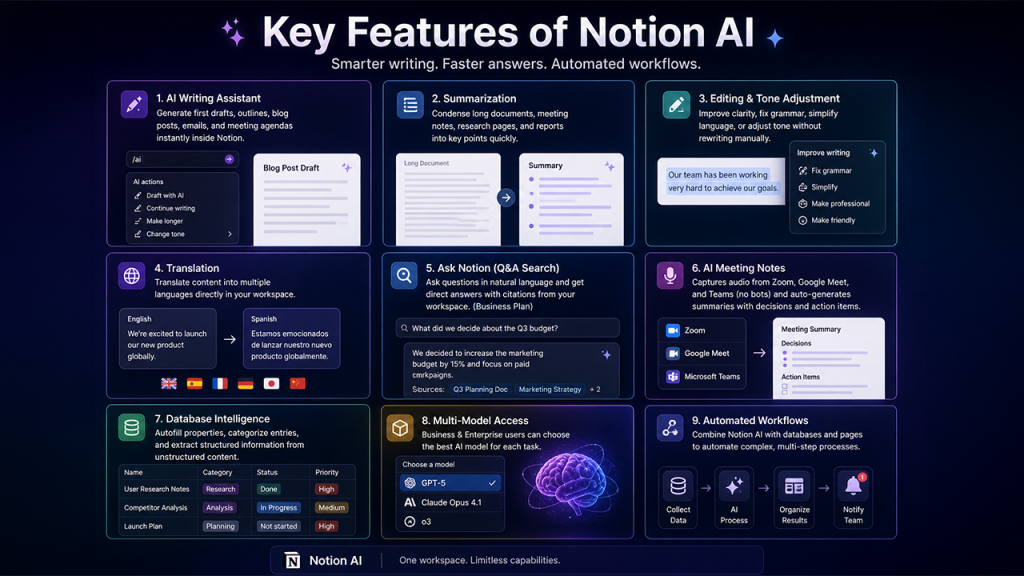
Notion AI brings multiple capabilities into one workspace, enabling faster writing, smarter organization, and automated workflows.
AI Writing Assistant: It generates first drafts, creates outlines, blog posts, emails, and meeting agendas directly inside any Notion page. When you type /ai or press Space on an empty line and a prompt panel appears instantly.
Summarization: You can paste or open any long document and ask Notion AI to condense it into key points. This feature is particularly useful for summarizing meeting notes, research pages, and lengthy reports in a short time.
Editing and Tone Adjustment: You can ask the AI to improve the clarity of your content, fix grammar, simplify language, or adjust the tone of any existing content without having to rewrite it manually.
Translation: You can use Notion AI to translate content into multiple languages directly inside your workspace. It is especially useful for international teams and multilingual documentation.
Ask Notion (Q&A Search): It searches across your entire workspace using natural language. Instead of manually hunting for a document, you can just ask a question and get a direct answer with citations pulled from your own pages. This feature is available on the Business plan. This experience mirrors the growing category of AI search tools that prioritize direct answers over cluttered results.
AI Meeting Notes: It also captures system audio from platforms like Zoom, Google Meet, and Microsoft Teams without needing any bots. Notion AI also auto-generates summaries with decisions and action items.
Database Intelligence: It autofill database properties, categorize entries into different groups, and extract structured information from unstructured content across your workspace.
Multi-Model Access: Business and Enterprise users can toggle between leading AI models including GPT-5, Claude Opus 4.1, and o3, choosing the right model for each task.
How to Use Notion AI (Step-by-Step Guide)
Getting started with Notion AI is easy. Here's what you need to do.
Step 1: Access the AI Prompt
Visit any Notion page, press the Space bar on an empty line, or you can type /ai. A prompt window will appear containing suggested actions including Draft, Summarize, Improve Writing, and more.
Step 2: Choose an Action or Enter a Custom Prompt
You can choose from the preset options or describe exactly what you need in plain, simple language. For instance, type “Write a project brief for a new product launch based on this page” and AI will use the content of the mentioned page as context to give you accurate results.
Step 3: Review and Refine AI Output
Notion AI generates a solid first draft consistently. It rarely produces unusable or inconsistent results, but it is considered good to always review its output. If you’re not satisfied with the result, you can edit, expand, or ask it to try again with a different tone or angle.
Step 4: Use Ask Notion for Search
On the Business plan, open the search bar and type a question in a natural language such as "What did we decide about the Q3 budget?" The AI scans your entire workspace and returns a direct answer with source citations.
Step 5: Set up AI Agents for Automation
In the Agents section, describe your daily workflow, such as compiling weekly project updates from multiple databases and let the agent handle it autonomously on a predefined schedule.
With Notion AI, the learning curve is genuinely low. You’ll be able to use it within minutes of your first session.
Notion AI Use Cases (Real-World Applications)
Notion AI is versatile enough to support a wide range of real-world workflows.
Content Creation: Writers and marketers use it to create blog outlines, generate social media drafts, email copy, and content briefs without switching tools. The AI pulls context from existing brand guidelines or campaign notes that are stored in the workspace to produce accurate, relevant results.
Onboarding: HR and people in teams use AI to draft onboarding documents, training guides, and FAQ pages quickly, keeping internal knowledge bases current without significant manual effort.
Meeting Documentation: AI Meeting Notes captures and summarizes conversations automatically, producing action item lists and decision logs that would otherwise take 30 minutes to write by hand.
Research and Analysis: Researchers and analysts paste large volumes of text and ask Notion AI to extract key findings, identify themes, or generate structured summaries ready for reporting.
Knowledge Management: Large teams use Ask Notion to find answers from their internal wiki instantly, reducing the time employees spend searching for information across scattered documents.
Project Management: Teams use AI to auto-generate project plans, summarize status updates across databases, and draft stakeholder reports. This reduces manual work, improves collaboration, and helps teams keep projects organized and on schedule.
Notion AI Agents (Automation & Autonomous Workflows)
Introduction of autonomous Agents, launched with Notion 3.0 in September 2025, is the most significant development in Notion AI’s evolution.
Previously, Notion AI responded to prompts. You asked, it answered. Agents flip that model. Now, when you describe a goal, the Agent works through it independently. A single Agent can work independently for up to 20 minutes. It can handle complex multi-step tasks such as building a complete project launch plan in detail, compiling user feedback from across entire workspace, or updating hundreds of database entries simultaneously. Agents also connect to external tools including Google Drive and Slack, extending their reach beyond Notion itself. Your constant involvement is not needed anymore. Teams that need deeper cross-platform automation can also explore dedicated IT automation tools like Zapier or Make alongside Notion Agents
Notion AI Pricing Plans (Updated 2026 Breakdown)
Notion restructured its pricing significantly in May 2025. It removed the standalone AI add-on and bundled full AI access into higher-tier plans.
| Plan | Price (Annually) | Price (Monthly) | AI Access |
| Free | $0 | $0 | One-time 20-response trial only (no reset) |
| Plus | $10/user/month | $12/user/month | One-time 20-response trial only; no ongoing AI |
| Business | $20/user/month | $18/user/month | Full AI: Agents, Ask Notion, multi-model, meeting notes |
| Enterprise | Custom | Custom | Full AI + zero data retention, SCIM, SSO, audit logs |
Users who subscribed to the old AI add-on before May 13, 2025, will retain their previous pricing, provided they maintain their subscription without cancelling.
Notion AI Alternatives (Top Competitors Compared)
Notion AI is quite strong, but it is not right for everyone. Here are the most credible alternatives depending on your needs.
ChatGPT: It is a good option if you are looking for a flexible, brainstorming, and free-form writing tool for general purposes. It also offers broader model selection and image generation. However, it lacks awareness of your existing workspace, so you’ll have to explain everything.
ClickUp AI: It is designed specifically to manage project workflows. It is available at $7, which is cheaper than Notion AI. Its main features include task generation, sprint planning, and summarizing meetings.
Coda AI: It combines documents, tables, and automation into flexible “docs-as-apps" with strong AI assistance. It supports integrations with over 7,000 apps via Zapier and is a solid alternative for teams that need document-centric workflows with native automation.
Microsoft Loop: If your organization already uses Microsoft 365, then it is worth considering this one. It offers collaborative document blocks with AI features through Copilot and integrates natively with Teams, SharePoint, and OneDrive.
For creators focused purely on capturing and organizing ideas, note-taking and idea management tools offer a simple, distraction-free alternative to feature-heavy productivity platforms like Notion AI.
The right alternative depends on the needs of your team whether it’s managing documents, tasks, or conversations.
Final Thoughts: Is Notion AI Worth It?
Notion AI is a genuinely useful tool for anyone who writes, organizes, and manages knowledge inside a single workspace. The AI Agents update transformed it from assistant to executor. It is not perfect, but it is worth considering Notion if it is already central to your daily workflow. Explore the plan that fits your team size and budget, test the features honestly, and let the results speak for themselves.



.png)
.png)